Creating Audit Groups
Use Audit Group Maintenance (36.12.13.1) to group all the tables you plan to audit, or to group related database tables for auditing purposes. Audit groups streamline the setup process by letting you refresh and activate the profiles for all the member tables at once, instead of maintaining one table profile at a time.
For example, set up a financial audit group to track financial transactions and a manufacturing group to separately maintain the profiles for manufacturing transactions. Add tables to each group to accommodate your specific data tracking and maintenance requirements.
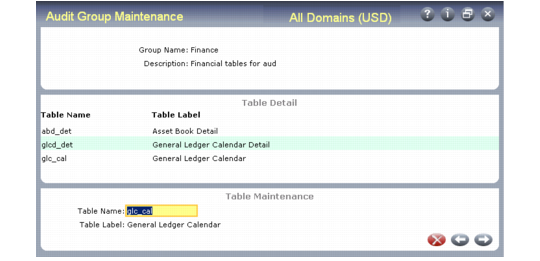
Audit Group Maintenance (36.12.13.1)
Specify a group name, up to 8 characters. An audit group cannot have the same name as a database table. Then provide a brief description and press Go to display the Table Maintenance frame. In this frame, add as many tables to the group as required. After they have been added, the tables display in the Table Detail frame.
Use Audit Group Report (36.12.13.2) to display the records defined in this program.