Activating Audit Profiles
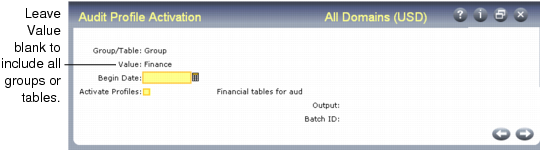
After completing the workbench table profiles, use Audit Profile Activation (36.12.13.8) to activate profiles for one table or a group of tables. Activated profiles are staged for auditing to begin on a future date; auditing does not occur immediately after a profile is activated. On the specified begin date, the system begins generating auditing information as defined by each activated table profile.
Audit Profile Activation (36.12.13.8)
Profiles cannot be activated on the begin date. Plan all changes ahead of time and activate updated profiles before their begin date. Profiles must have the begin date set to sometime in the future. Activated profiles become effective at 12:00 AM on the begin date.
You can execute this program in batch mode if you are activating a group with many associated tables.
When this program completes execution, it generates a report that displays information for each table in the activated profile that includes:
• The table name and description
• Information from the active profile being replaced, if one existed, including the previous setting for begin date, audit trail, and the delete event keys
• Information from the now active profile, including the new setting for begin date, audit trail, and the delete event keys
If Activate Profiles is set to No, only the report is generated; the profiles currently in use are not updated.
When Activate Profiles is Yes and all processing is complete, an e-mail is sent to the system administrator group defined in Security Control notifying them of the changes to the activated audit profiles.
Use Activated Audit Profile Report (36.12.13.9) to display details about activated profiles.