Defining Schedule Periods
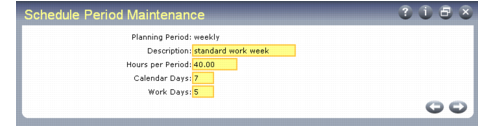
Use Schedule Period Maintenance (17.21.1.1) to create period codes, which include day and hour parameters used throughout flow schedule processing. Schedule periods must be set up before you can define schedule codes in Schedule Code Maintenance (17.21.1.19).
Note: This program is also used to define schedule periods used in the Kanban module. This section discusses only the way it is used with flow scheduling functions. See User Guide: Kanban.
Schedule Period Maintenance (17.21.1.1)
Planning Period
Enter a code identifying a period to be used on a flow schedule.
Because scheduling periods are used by both flow scheduling and kanban functions, you cannot delete a scheduling period that is either:
• Referenced by a production line schedule code record defined in Schedule Code Maintenance
• Associated with an existing maximum demand record in Maximum Demand Maintenance (17.22.10)
Description
Enter a brief description of this planning period (24 characters).
Hours per Period
Enter a decimal greater than 0 (zero) indicating the total number of production hours in the scheduling period.
Calendar Days
Enter the number of calendar days in this planning period. This must be greater than or equal to the value of Work Days.
Flow Schedule Maintenance uses this value in combination with the start date of the associated schedule code to determine a date range for the schedule.
Work Days
Enter the number of work days in this planning period. This cannot exceed the value of Calendar Days.
The system uses this field in combination with Hours per Period to calculate the number of hours available during each day. This is a simple average; the system does not use the shop calendar or repetitive shift calendar to determine actual work days and hours. If different hours are worked on certain days in your manufacturing environment, you should set up separate periods for the differing work schedules.