Associating Items with Production Lines
Use Production Line Item Maintenance (17.21.1.7) to identify items that can be scheduled for a flow production line.
Important: In Flow Schedule Maintenance, you can enter an item on a flow schedule for a production line only when it has been associated with that production line using this program. Additionally, Import MRP Planned Orders selects orders only for items that have been defined in this program.
A preference value assigned to each item allows the system to determine priorities for assigning MRP-driven demand for items that can be produced by multiple lines. When you import planned orders for such items, the system selects the production line with the lowest value in the Preference field as the primary line for producing the item.
You cannot update information about the production line itself in this program. Instead, use Production Line Maintenance (17.21.1.4).
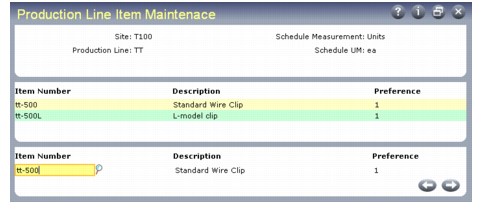
In the first frame, enter the site and production line code for a line already defined in Production Line Maintenance. The system displays the schedule measurement and UM values from the default schedule code for the production line, if one is defined.
Production Line Item Maintenance (17.21.1.7)
In the center frame, the system displays any existing items assigned to this production line. Use the bottom frame to edit existing item records or enter new ones.
Item Number
Enter the number of an item that can be manufactured on this flow production line. This must be a valid item defined in Item Master Maintenance (1.4.1).
An item can be associated with more than one production line.
A unit of measure conversion must be defined in Unit of Measure Maintenance (1.13) when:
• The production line is associated with a default schedule code in Production Line Maintenance.
• The default schedule code has a schedule unit of measure specified in Schedule Code Maintenance.
In this case, a UM conversion record must exist between the schedule UM and the item’s stocking UM. Otherwise, the system displays an error.
Preference
Indicate the relative priority the system should assign to this production line when you use Import Flow Schedules from MRP (17.21.9) to create flow scheduled orders for this item based on MRP-generated data.
Valid values are integers greater than 0 (zero). A lower value indicates a higher preference.
When determining which production line should be used to fill MRP-generated demand for a flow-scheduled item, the system looks at all production lines for the site that can produce the item. If it finds more than one, the system considers the instance with the lowest Preference value as the primary line.
A primary line must exist during data entry. If a record exists for the same item-site combination on a different production line, you can enter the same Preference value here only if a third line has a lower value so that it can be used as the primary production line. Otherwise, you cannot complete line entry without assigning a different Preference value.
Similar logic applies when you delete an item from a production line. For example, you can produce the same item on production lines 100, 200, and 300. Production line 100 has Preference for the item set to 1; for lines 200 and 300, it is set to 2. If you delete the item from production line 100, the system cannot resolve which should be the primary line for this item. In this case, a warning message displays when you delete the item from production line 100.
To delete an existing item record from this production line, press Delete when the cursor is in the Preference field. The system verifies that the item is not included on a flow schedule for this production line with a due date later than today. If it is, a warning message displays.