Copying Flow Schedules
Use Flow Schedule Copy (17.21.5) to copy existing flow scheduled orders to new flow schedules.
The copied order includes much of the same data as the original, such as site, production line, item number, and schedule quantity. The due date is modified based on the specified target date range. Other values in the new record are blank even if the source order included values in the corresponding fields; for example, the system does not copy references to sales orders or work orders, and the Completed field is set to 0 (zero).
For each flow scheduled order copied, the system creates a new type W (flow) work order just as it does when you enter a new order using Flow Schedule Maintenance.
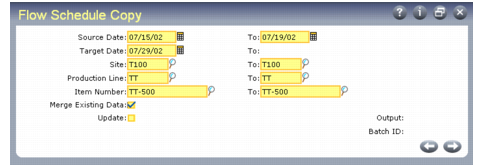
Flow Schedule Copy (17.21.5)
Enter the range of dates you want schedules to be copied from, as well as the target start date for the newly created schedules. Using the specified selection criteria and a calculated target date range based on due dates for existing schedules, the system copies existing flow schedules to the corresponding dates in the target date range.
For example, you enter a source date range of 5/15/02 to 5/22/02 and a target date of 6/15/02. The systems finds schedules with due dates of
5/16, 5/19 and 5/20 that match the selection criteria. It copies the data from those schedules into new schedules with due dates of 6/16, 6/19, and 6/20.
To see the effects of this program without actually copying orders, set Update to No. Then review the output report, adjust selection criteria as required, and run the program again with Update set to Yes.
Merging Data
In some cases, you might be copying a scheduled order to a new date range that already includes a matching record for the item.
Use the Merge Existing Data field to indicate how the system should manage a copied order when this occurs.
No: The system does not create a new schedule for that order. On the output report line for that order, Source From Due Date is blank and Existing Schedule displays Yes.
Yes: The system adds the quantity from the copied order to the existing flow scheduled order. On the output report line for that order, the same due date displays in both Source From Due Date and Schedule Due Date. Additionally, Existing Schedule displays Yes.
The system also adds the quantity to the associated work order for the target date. This can be either the system-generated type W work order or the standard work order referenced in the Work Order field.