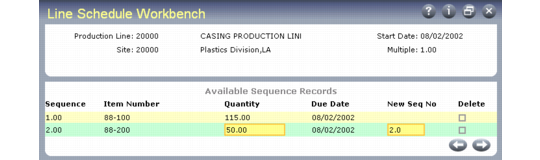
Simulating Schedules in the Workbench
You can use a single repetitive schedule for an item that is manufactured on a single production line with a known rate of production. However, consider using Line Schedule Workbench (18.22.1.10) to create simulated schedules when:
• Many different items are produced on a single line.
• Several different lines produce the same item.
• The production rate of a line varies.
You can use Line Schedule Workbench to:
• Create a simulated repetitive schedule (line schedule) for a specific production line and site combination.
• Have the system automatically modify line schedules based on the capacity constraints of the specified production line.
In addition, Line Schedule Workbench lets you update or create repetitive schedules from MRP planned orders. When planned orders for line‑manufactured items are approved, these orders are added to the item’s line schedule. The sequence in which orders are added to a schedule can be controlled using the Sort by Run Sequence field in Planned Repetitive Sched Approve (23.8). You can review and modify sequences, quantities, and dates as needed.
Simulation usually takes place during production planning. The planner creates a line schedule that meets production requirements and balances line utilization and then uses it to generate repetitive production schedules.
The line schedules you create in the workbench are simulations only and are not considered by MRP or other planning functions until you copy them to repetitive schedules using Repetitive Schedule Update (18.22.1.18).
To create a simulated schedule, specify the production line, site, and start date. Set the Multiple field to a positive number to limit the quantity for each line sequence record to multiples of that number.
Then, enter production quantities and dates into the workbench or review and modify existing sequence records as needed. Each entry has a sequence (priority) number. By manipulating the sequence number, you can change the order in which items will be manufactured.
Note: Use Insert to create a new line sequence record in the workbench.
Line Schedule Workbench (18.22.1.10)