Using Repetitive Picklists
In most repetitive operations, issues are managed solely by backflushing. However, in many operations, you also need to manage the movement of inventory to the point where it is used. In environments where inventory is stored on the production line, the repetitive picklist lets you easily replenish the line’s work centers.
Use repetitive picklists to move inventory from stocking locations to a work center. To use this method, you must define work centers as inventory locations.
Each repetitive schedule creates inventory requirements at the work centers in its routing. When you run Repetitive Picklist Calculation (18.22.3.1), the system:
• Determines the available inventory and requirements at each work center for the specified range of parent items
• Determines where shortages exist
• Allocates inventory to meet shortages
• Creates a picklist for each work center shortage
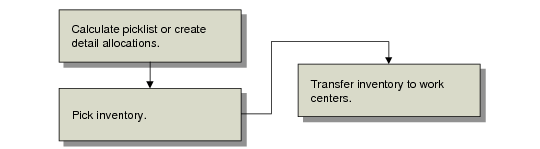
Picklist Processing Flow
The system creates a picklist if there is a shortage and inventory is available to be picked. When you print the picklist, the inventory is picked. Use Repetitive Picklist Transfer (18.22.3.6) to transfer the inventory from its current inventory location to the work center. This move is a location transfer, not an issue to WIP, so there are no GL transactions until the inventory is backflushed.
Example: Item A is installed in four different end items at work center OPS. The work center has 900 of Item A on location. For the next week, the repetitive schedules for these items have a total requirement of 1,000. The repetitive picklist calculation will show a shortage of 100 of Item A at OPS and detail allocates 100 at the inventory location. When the picklist is printed, the 100 will be shown as picked, and 100 will be moved to location OPS when the transfer is run. The inventory will not be issued until labor is reported for each operation.
Note: To use picklists, you must set up a location with the same ID as the work center.