Component Check Calculations
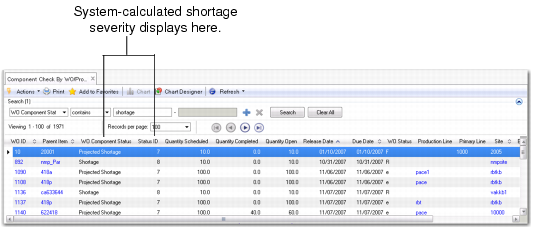
The system calculates component availability for a work order component record by calculating projected quantity on hand (PQOH) using MRP supply and demand detail information. The calculation results display in two columns within the Work Order and Work Order Component Browses:
• Component Status
• Status ID
Work Order Browse
The Component Status column displays a textual description of the status, while the Status ID column displays the numeric value of the severity. Status IDs can range from 1 to 8, with 8 being the highest severity. The following lists the possible Status IDs and associated Component Status:
1: No components. The work order does not have any components.
2: Issued complete. All materials have been issued for the work order component.
3: Available. Sufficient inventory is projected to be available for the work order component. This only includes nettable on-hand inventory. It does not include unconfirmed shipper receipts (for example, ASNs), scheduled receipts (for example, purchase orders) and planned receipts (that is, MRP planned work orders).
4: Unconfirmed shipper receipts. A PO shipper receipt was created but not confirmed (for example, goods may still be in transit). Sufficient inventory is projected to be available for the work order component. This includes nettable on-hand inventory and unconfirmed shipper receipts.
5: Scheduled receipts. Sufficient inventory is projected to be available for the work order component. This includes nettable on-hand inventory, unconfirmed shipper receipts, and scheduled receipts.
6: Planned receipts. Sufficient inventory is projected to be available for the work order component. This includes nettable on-hand inventory, unconfirmed shipper receipts, scheduled receipts, and planned receipts.
7: Projected shortage. There is insufficient inventory projected to be available for the work order component. This includes nettable on-hand inventory, unconfirmed shipper receipts, scheduled receipts, and planned receipts. This applies to work orders with status P(lanned), F(irm), B(atch) and E(xploded) only.
8: Shortage. There is insufficient inventory projected to be available for the work order component. Nettable on-hand inventory is not sufficient to cover requirements. This applies to work orders with status A(llocated) and R(eleased) only.
The system considers the status of a work order. Work orders can have a status of:
• (P)lanned
• (F)irm
• (B)atch
• (E)xploded
• (A)llocated
• (R)eleased
The system groups the work order statuses into three commitment categories when calculating component availability:
• Planned work orders are in the Plan category.
• Firm, Batch, and Exploded work orders are in the Firm category.
• Allocated and Released work orders are in the Release category.
Demand Supply Browse
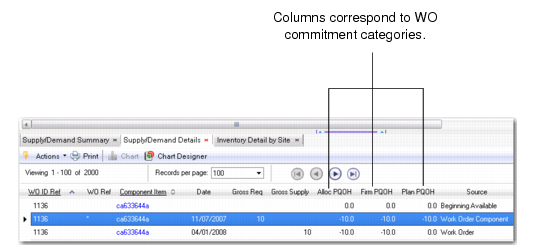
These categories correspond to the three PQOH columns that display in the Supply/Demand Detail Browse.
Supply/Demand Detail Browse, PQOH Columns
The system uses the commitment category to determine into which PQOH column it compiles the work order. Use the information in Supply/Demand Detail to view MRP supply and demand detail data for a component by date.
Demand/Supply Summary Browse
There can be hundreds of MRP detail records for the component you select; but how do the records relate to the component of the work order you selected?
For a selected work order and work order component, the system collects and totals all MRP supply and demand records prior to, and including, the work order record you selected. You can see these aggregated records in the Supply/Demand Detail Browse.
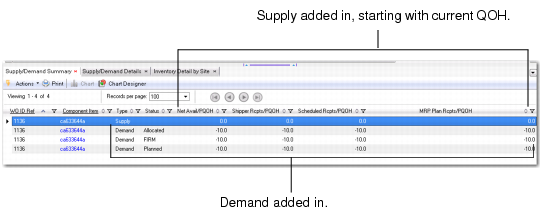
The Supply/Demand Summary Browse lets you view the aggregated records from a matrix point of view:
• The first row in the display is the Supply Row. It lists the current QOH for the work order component item and other sources of cumulative supply up through the work order component’s demand release date.
• The next three rows are Demand Rows. They list the three categories of demand. Each row starts with prior demand requirements and the gross requirements of the selected work order. Then from left to right, it adds in the current QOH, then adds in the cumulative supply to calculate the component PQOH.
This supply and demand matrix format provides you with a global view of component supply/demand.
Supply/Demand Summary
The following sections provide more information on individual component check programs.