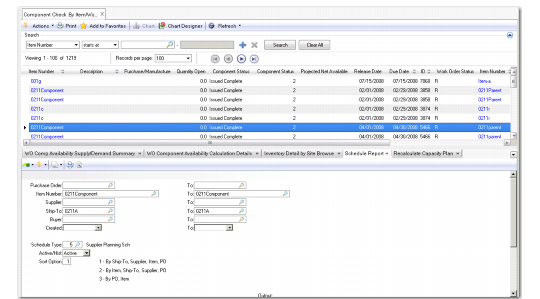
Component Check by Item/Work Order
Materials planners can use Component Check by Item/Work Order to quickly identify the components they manage and determine if there are shortages that impact production. Material managers or expediters typically use this program to ensure that there are no component shortages for scheduled production orders. They can view a list of items and the jobs (work orders) that are impacted by item shortages. Having this information helps keep production running and expedites order processing.
Material planners use Component Check by Item/Work Order to:
• Select from a wide range of item attributes to include in the component check, such as buyer/planner codes.
• Identify which items have component or material shortages related to them.
• Identify the work order to which the shortage is related.
• Locate and determine the cause of material shortages.
Component Check by Item/Work Order
Displaying Components
Your purchased component may not display in Component Check by Item/Work Order Browse. When this happens, it is typically because:
1 The browse is driven by work order demand records where an exploded BOM exists. An item/record only displays when it is created by an exploded BOM record. If the purchased part demand is driven directly from a sales order, forecast, safety stock, and so on, the item/record does not display in the list.
2 If the item belongs to a BOM of a manufactured item but still does not display in the list, it is because you need to run CRP to explode the P(lanned) status work order to which this item belongs. Run CRP for planned orders to generate the exploded BOM.