Start WebSpeed
The WebSpeed server is used for admin log-in sequences and for user validation. The WebSpeed ubroker.properties file holds all the configuration information used by WebSpeed. Use these steps to start the WebSpeed servers and broker.
Note: Review the log files in the Progress work directory for diagnostic help.
1 Start the AdminServer using the following command:
ProgressHome/bin/proadsv -start
Validate that it is running using:
ProgressHome/bin/proadsv -query
2 Start the NameServer for your broker:
nsman -name NS1 -start
Check the status of the NameServer using:
nsman -name NS1 -query
3 The MFG/PRO database servers for the Production database set should already be running. You can verify this by attempting to restart them. Go to QADInstallDir and run (for UNIX):
./start.Production
For Windows:
startProduction.bat
If they are not running, they will start. If they are running, a message for each database displays informing you the databases are running.
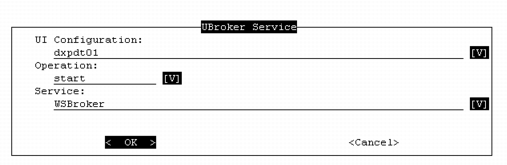
4 The remaining steps can be done in MFG/UTIL. In MFG/UTIL, open UI|UBroker Services Operations.
UBroker Services Operations Set to Start the WebSpeed Broker
5 Select the UI configuration.
6 Set the Operation to start, stop, or query.
7 Select either the WebSpeed broker or the AppServer. Start the WebSpeed broker first, then the AppServer. Query each one after you start it to make sure it is up and running.
8 Choose OK to launch the operation. The log window displays.
9 Choose Close in the log window to proceed to the next operation.
To start, stop, or query the UI configuration WebSpeed broker from the Progress /bin directory, use the following syntax:
wtbman -name uiconfig_WS -start
wtbman -name uiconfig_WS -query
wtbman -name uiconfig_WS -stop
For the UI configuration AppServer, the syntax is:
asbman -name uiconfig_AS -start
asbman -name uiconfig_AS -query
asbman -name uiconfig_AS -stop