Define the Log-In Sequence Script Lines
To log in to and begin a telnet session on the telnet server, you must provide the sequence of telnet server log-in prompts and responses. The last value in the sequence specifies the script you created in MFG/UTIL. Following these step-by-step instructions is a set of sample script values for Windows and UNIX systems.
Important: In the QAD .NET UI, the log-in sequence must be specified, but the values are ignored. In character display mode, the user’s QAD Standard Edition user ID and password must match their UNIX user ID and password exactly.
When defining paths for scripts used in the QAD .NET UI, avoid using relative paths since each user’s access may be different.
Log-In Script Line
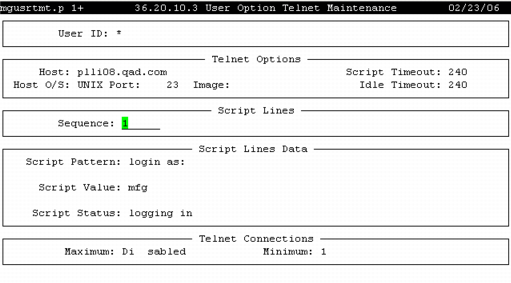
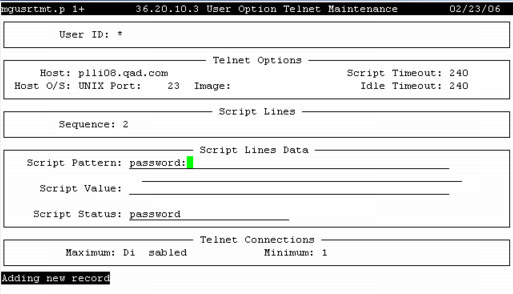
5 Specify the telnet log-in sequence number in the Script Lines frame. For each telnet command, enter a sequence number beginning with 1, and press Go. In the next frame, enter the following:
Script Pattern
Enter the prompt generated by the telnet server when a telnet log-in occurs. The values in this field must be identical to the prompts the telnet server displays when users log in.
Script Value
Enter the response to the telnet log-in prompt defined in Script Pattern.
Script Status
Optionally enter a description of the prompt and response; for example, Logging In.
If you have tracing enabled and the Java console is displayed, the description in the Script Status field displays in the Java console on the Desktop client when an error occurs during the execution of the prompt and response. You can use these descriptions as an aid in troubleshooting telnet session issues.
Note: In QAD Standard Edition, when you enter a password as a script value, only blanks display. When you press Go at the end of the sequence, you are asked to confirm the password.
6 Press Go after entering the sequence values. You return to the Sequence field to enter the next sequence number and values.
Second Log-In Script Line
7 After entering the final sequence, press Go to return to the Sequence field. Then press End to move to the Telnet Connections fields.