Migration Reporting
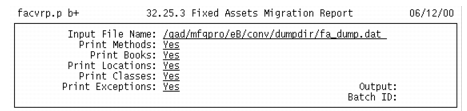
Use Fixed Assets Migration Report (32.25.3) to generate a report that summarizes the migrated fixed-asset data. The report shows the migrated data from the legacy system and the newly mapped data for the new system.
You can choose to include books, methods, locations, classes, and exceptions in the report.
Fixed Assets Migration Report (32.25.3)
1 In the Print Books field, enter Yes to include migrated book data from the legacy system and the newly mapped book data in the report. Enter No to exclude book data.
2 In the Print Methods field, enter Yes to include migrated method data from the legacy system and the newly mapped method data in the report. Enter No to exclude method data.
3 In the Print Locations field, enter Yes to include migrated location data from the legacy system and the newly mapped location data in the report. Enter No to exclude location data.
4 In the Print Classes field, enter Yes to include migrated class data from the legacy system and the newly mapped class data in the report. Enter No to exclude class data.
5 In the Print Exceptions field, enter Yes to include exceptions for your data. Enter no to exclude the exceptions.