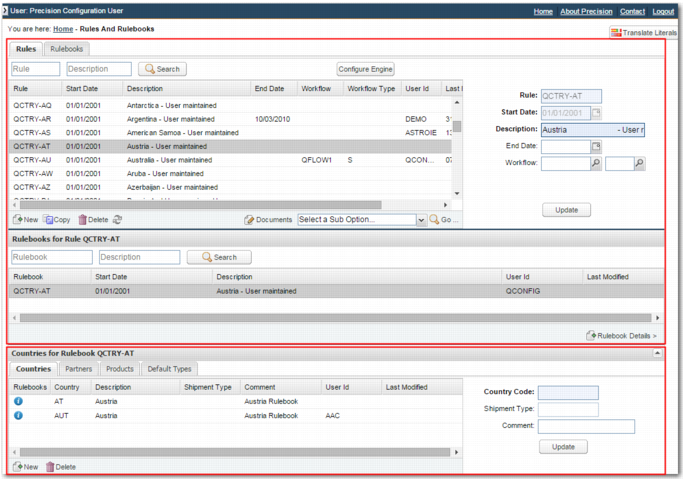
Rules and Rulebooks Screen
To create and view rules and rulebooks, use the RULES option.
Rules and Rulebooks Screen
The Rules and Rulebooks screen is divided into upper and lower sections.
Upper Section
The Rules tab displays all rules. You can create, view, update, and delete rules in the rules grid. You can add documents and sub-options to a rule. You can also view the rulebooks that a rule is associated with in the Rulebooks for Rule <RULE_NAME> grid.
The Rulebooks tab displays all rulebooks. You can create, view, update, and delete rulebooks in the rulebooks grid. You can also view the rules that a rulebook is associated with in the Rules Determinations for Rulebook <RULEBOOK_NAME> grid.
Both of these tabs contain a Configure Engine button, which enables you to access the System Values Setup screen, option Y3, with the Rules Engine tag selected in the Tag Search tab. For more information on system values related to rules and rulebooks, see
System Values for Rules and Rulebooks.
Lower Section
The lower section, <ASSOCIATION> for Rulebook <RULEBOOK_NAME>, displays the Countries, Partners, Products, and Default Types tabs. When you select a rulebook in the upper section of the screen, these tabs display the countries, partners, products, and default shipment types associated with that rulebook. You can use the Create/Update section to the right of the grid to update these associations. These associations are important, as they are the methods by which rulebooks are associated with shipments, as listed in
Attaching Rulebooks to Shipments.