Dual Use – ECLI Check
This check determines whether an item—based on its assigned dual-use code known as an Export Control Classification Number (ECCN) in the US—can be shipped to or requires an export license to be shipped to a specific country. The XL screen is used to set up licenses for the ECLI check.
Precision provides a content subscription service for the regulations governing the United States and European Union. This content includes a list of ECCN codes. Ensure that you classify your company products with the appropriate ECCN codes.
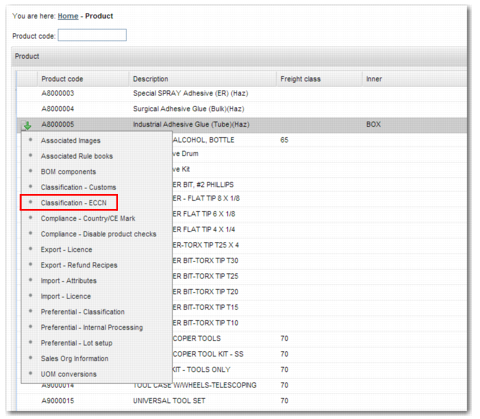
To classify a product with an ECCN code:
1 Open option PR.
2 From the product code list, select the product you want to classify.
3 In the sub-options, select Classification – ECCN.
Product Classification
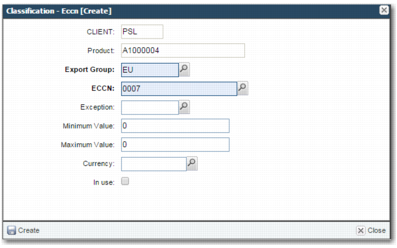
4 Create a new record.
5 Enter a valid export group and a valid ECCN code.
6 To add the record, click Create.
Classification – ECCN Create
Note: The Exception, Minimum Value, Maximum Value, and Currency fields are for future use.