Synchronous Model
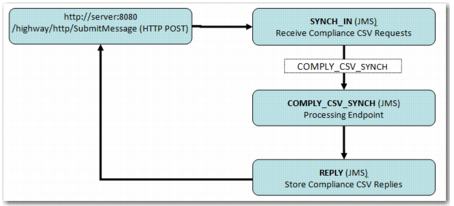
The synchronous model enables remote HTTP posting of a request file for immediate processing. This section describes the setup in Highway for the synchronous model.
Synchronous Model
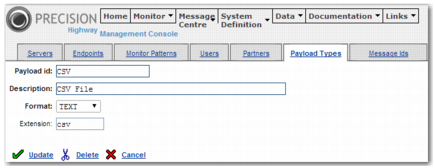
Payload Type
In Highway, select System Definition | Payload Types and add a new entry.
Payload Fields
Field | Value |
Payload ID | CSV |
Description | CSV text message |
Format | TEXT |
Extension | cvs |
Payload Entry
Message ID
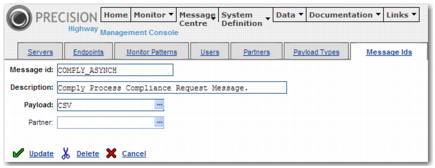
In Highway, select System Definition | Message IDs and add a new entry.
Message ID Fields
Field | Value |
Message Id | COMPLY_CSV_ASYNCH |
Description | Compliance CSV request (Synchronous) |
Payload | CSV |
Message ID Entry
Endpoint
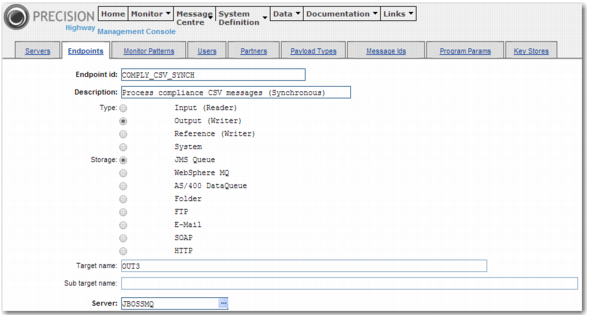
In Highway, select System Definition | Endpoints and add a new entry.
Endpoint Fields
Field | Value |
Endpoint ID | COMPLY_CSV_SYNCH |
Description | Process Compliance CSV messages (Synchronous) |
Type | Output (Writer) |
Storage | JMS Queue |
Target name | OUT3 |
Server | JBOSSMQ |
Program | a2a.ComplianceCsvHandler |
Return message endpoint | REPLY |
Message ID Entry
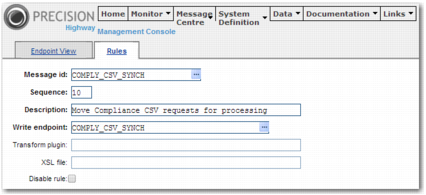
Rule
In Highway, select Message Center | Rules and add a new entry.
Rule Entry Fields
Field | Value |
Message ID | COMPLY_CSV_SYNCH |
Sequence | 10 |
Description | Move Compliance CSV requests for processing |
Write Endpoint | COMPLY_CSV_SYNCH |
Rule Entry