Web UI 4.7
Web UI User Experience Enhancements
Manifest Task
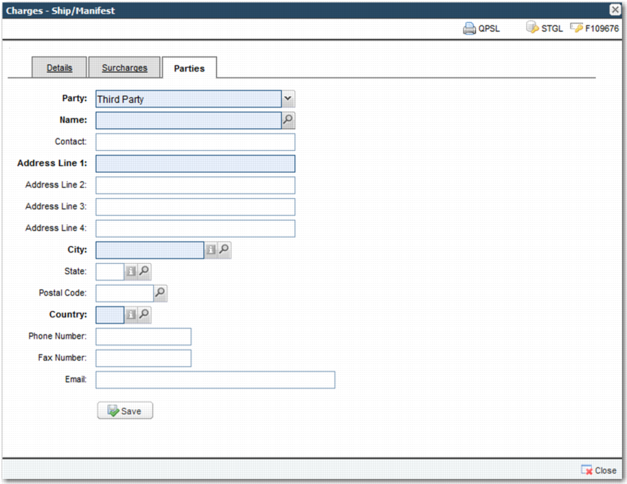
A new Parties tab has been added to the Manifest workflow task. On the Parties tab, you can update the following roles:
• Ship To
• Third Party
• Customer
• COD Party
You can also view the following read-only roles:
• Shipper
• Hold for Pickup
This functionality is available under the existing QuickPath option, WFTMAN.
Manifest Task: Parties Tab
Inquiry
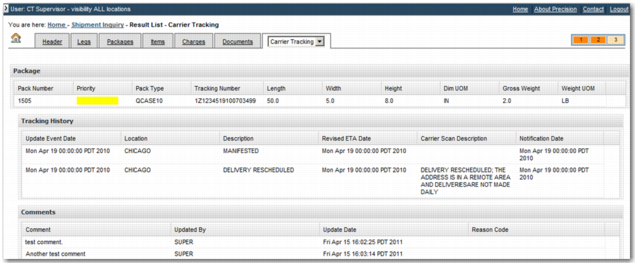
A Carrier Tracking tab has been added to the Inquiry View Details screen. It displays carrier tracking information from the PRECISON Exception Management (PEM) engine. The Carrier Tracking tab also contains general package information, package tracking history, and any PEM comments associated with the package.
Inquiry View Results Screen: Carrier Tracking Tab
To add the tab to the View Details screen, use the INQ RESULTS TABS system value.
INQ RESULTS TAB System Value
Category | Key | Value |
ITRAX | INQ RESULTS TABS | A comma-separated list where each entry represents a tab in the View Details screen; to display the Carrier Tracking tab, add Carrier Tracking to the list. For a list of other possible values, see the Inquiry chapter of Administration Guide: Base Web UI. |
This functionality is available under the existing QuickPath option NQ.
Scan, Pack and Ship
Functionality has been added to improve transaction processing times within the Scan, Pack and Ship screen.
• You can now define a function to automatically execute on loading a transaction. It is also now possible to configure preconditions that must be satisfied before this action is run.
• You can now define a function to automatically execute when the All items packed state of a shipment changes during the packing process. It is also possible to configure preconditions that must be satisfied before this action is run.
This functionality is available under the existing QuickPath option SNPKSH.
PEM Carrier Integrations
PEM integration capabilities have been added for the following carriers:
• Canpar
• Chronopost
• DHL Global Mail
• Trans-o-flex
System Value Maintenance
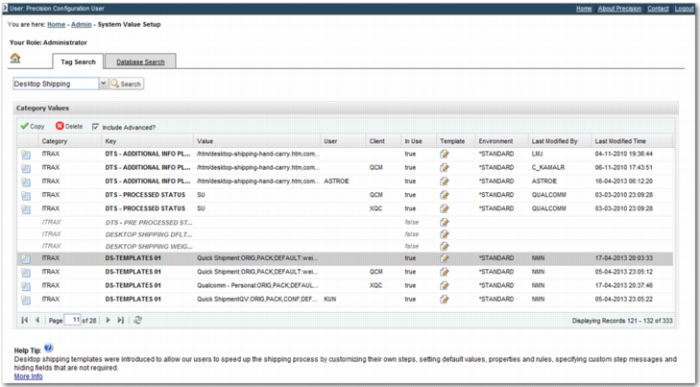
The System Value Setup page has changed. The page provides two views of the system value table.
• The Tag Search tab provides a managed view in which system values are described using metadata. System values are listed even if they do not physically exist in the database. Help is provided on the selected value, informing the user of its purpose and expected format.
• The Database Search tab provides administrators with access to the values stored in the database. The functionality is similar to the Y3 option available in the Windows UI.
System Value Setup Page: Tag Search Tab
The new page is available under the QuickPath option Y3. It replaces the old System Value Setup page.
Technical Enhancements
Invalidate Browser Cache
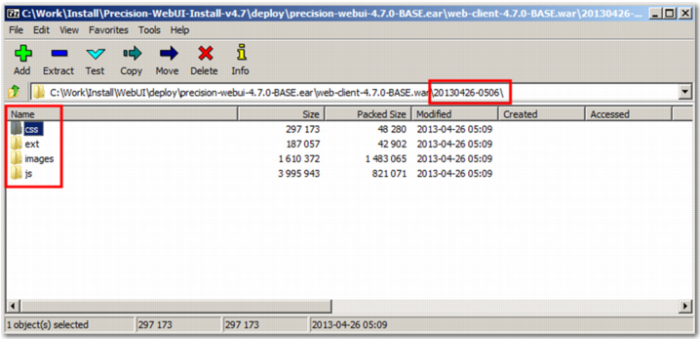
The underlying structure of the Web UI has been modified to incorporate a build number in the directory paths of resources that are typically cached by the web browser. The build number consists of the date and time that the release was built. In the past, a new version or patch of the Web UI required users to manually clear their browser cache. This step is no longer necessary, as updates include the new build number, and therefore the browser automatically caches the web resources that are released with the update.
Resource Directory Path with Build Number
The Login page and the About item in the Help menu now detail the build number in addition to the Web UI version.
The Web UI ear file now includes the word BASE, to indicate that it is part of the baseline but is compatible with the customized framework. Ear files built with customizations include a customer ID instead of BASE in the file name.
Minor Enhancements
• Workflow tasks that a user does not have permission to run now show in gray, allowing the user to clearly identify tasks that cannot be run.
• Previously, an ok message box displayed on completion of all background workflow tasks run within Scan, Pack and Ship. This message now displays only when it includes important information for the user.
• A new 404 error page replaces the default JBoss 404 error page.
• The session ID now changes when a user signs into the Web UI. This behavior protects against a security issue known as session fixation. A new property controls this feature: precision.login.changesessionidonlogin=true
• Three new note tasks, WFTNO2, WFTNO3, and WFTNO4 provide note functionality similar to the existing WFTNOT option. However, they each use a different URL, so permissions can be set up to allow different users to run different note tasks. This feature is useful in a workflow where manual checks need to be performed and the note tasks change the status of the shipment.
• You can now remove buttons from the Documents task window in workflow using the DOCUMENT TASK - HIDE BUTTONS system value.
DOCUMENT TASK - HIDE BUTTONS System Value
Category | Key | Value |
ITRAX | DOCUMENT TASK - HIDE BUTTONS | A comma-separated list containing one or more of the following: PRINT, EMAIL, SAVE, DELETE, ADD, HISTORY, GRID_PRINT, GRID_PREVIEW. |
• On drop-down menus, rather than initially showing Select, the default search field is selected.
Fixes
• A number of issues with the mobile pages have been corrected. This release fixes an issue with the mobile login page as well as fixing some client issues when querying PEM comments for a package.
• A number of issues with the workflow link task functionality have been resolved. Linked tasks are now recognized when called from within the Scan, Pack and Ship screen. A number of issues with linked tasks have also been corrected in the workflow page.
• An issue with clearing the generic maintenance cache has been resolved. Selecting Clear Cached Maintenance Information in the Administration section of the System Values menu now clears all cache information used to build list and selection panels.
• A number of XSS vulnerabilities have been removed.
• An issue with workflow auto searching has been fixed.
• A locale has been added to the Documents task. The locale now displays correctly when the Documents task is run from the Scan, Pack and Ship page.
• Delete data issues with packing functionality have been fixed.
• The number of AJAX calls used on the Workflow Portal page have been reduced.
• Issues with the inline login pop-up window have been fixed. It is now possible to disable this pop-up through configuration.
Performance
• A load test on Desktop Shipping was performed, and the findings are available in a load test results document.
Highway 3.3.1
There are no changes to the Highway database schema for this release.
Integration Enhancements
Update Shipment Web Services
The number of web services supported by Highway has increased. The solution now provides the UpdateShipment message as a web service. The full list of services available is
• CreateShipment
• RateShopShipment
• ShipShipment
• ProcessShipment
• ProcessEOD
• ReprintShipment
• VoidShipment
• QueryShipment
• ProcessComplianceRequest
• ShowComplianceResult
• QueryPEM
• UpdateShipment
The latest WSDL file is installed by the Web UI installer in the \data\wsdl\Precision-3.3.1.wsdl folder, or can be obtained when the solution is running by accessing http://localhost:8080/highway/ws/precision?wsdl
Fixes
• The Mail writer endpoint has been modified to include a connection timeout. If there is a problem connecting to the SMTP server when trying to send an e-mail, the request now times out after 60 seconds.
• The Overwrite Message Id flag on the endpoint record was not being read correctly from the database. This issue is now fixed.
• Highway was not able to parse the detail in the PERSISTENCE_LOCATION Highway setting when an Oracle RAC URL was specified. This issue is now fixed.
• When a HTTP request is received, UTF-8 is now used by default in the response encoding.
• A new custom parser for Dachser FTP has been added so that Highway can correctly pull PEM updates from myFtp.dachser.com.
Installer Changes
Java
• Java 1.6_45 is now installed by the installer.
• By default, the 64bit version of Java is selected to be installed.
4GL Listener
• New versions of the Listener OCX and DLL components are installed. These components have been rewritten to work with Java 6 (1.6_45).
• Java 1.3.1 is no longer installed.
Highway Database
Additional PEM data has been added to the Highway database to help to set up connectivity with Canpar, Chronopost, DHL Global Mail, and Trans-o-flex. XML files containing the PEM data can be found in the \data\highway-db folder.