How QAD improves negotiations
Package Exceptions Summary Dashboard
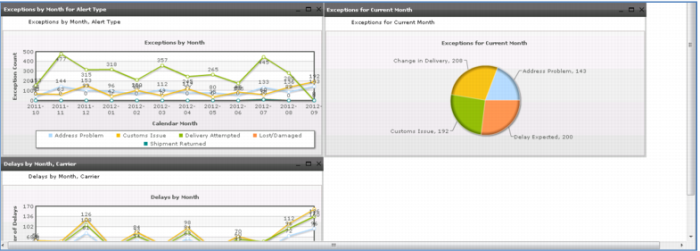
Go back to browser-based Business Intelligence and look at the Package Exceptions Summary dashboard there. This dashboard provides a different way of looking at delivery performance, showing delays and exceptions by carrier and type – problems with addresses, customs issues, lost or damaged shipments, or returned shipments. You select the exceptions you want to see and for what period.
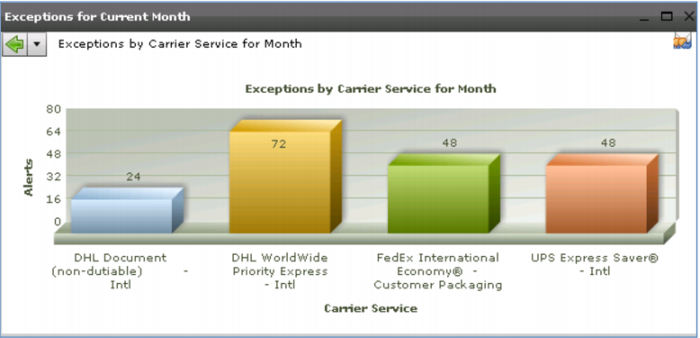
This dashboard also gives you a monthly summary by exception type and carrier, useful in performance evaluations and negotiations.
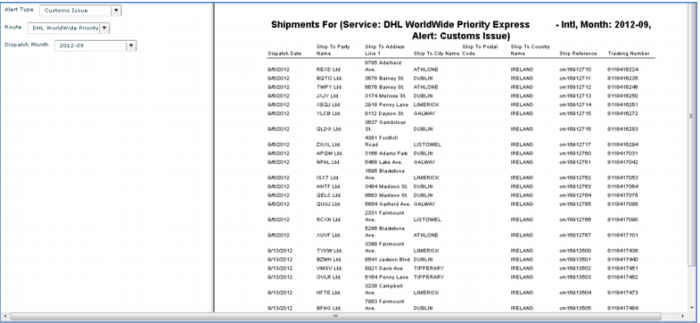
As with the other dashboards, you can select parameters and drill down to find out all the details, optionally exporting the information to an Excel worksheet or pdf.
Demo
1. From the browser (not the mobile device) select Dashboard > QAD Standard > Transportation Management > Package Exceptions Summary
2. (Optionally) Uncheck Address Problem, click Refresh
3. In Exceptions for Current Month, click Customs Issue
4. Click DHL – Worldwide Priority Express Intl
Key Points
• Visually identify exceptions
• Drill down to details