How QAD encourages collaboration for improved decision-making
Collaborate
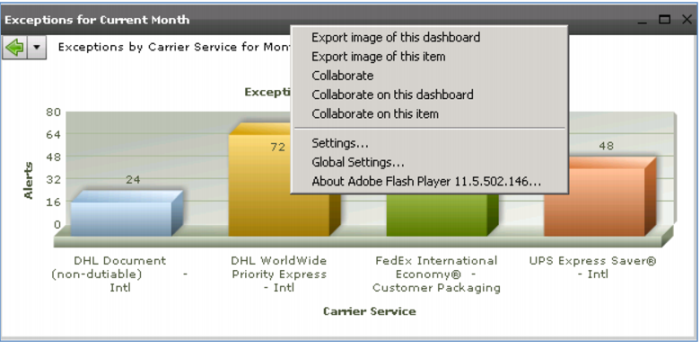
At this point, you may want to talk to others about the excessive number of customs issues this month. Just click Collaborate and you can post a note to the discussion forum, attaching a copy of this pie chart so that anyone looking at your posting will see exactly what you are referencing.
Collaboration forums allow interactive discussions between multiple people, with a full history.
Demo
1. Click Business Intelligence System tab
2. In Exceptions for Current Month, right-click in the title-bar
3. Click Collaborate on this item
4. Click Package Exceptions
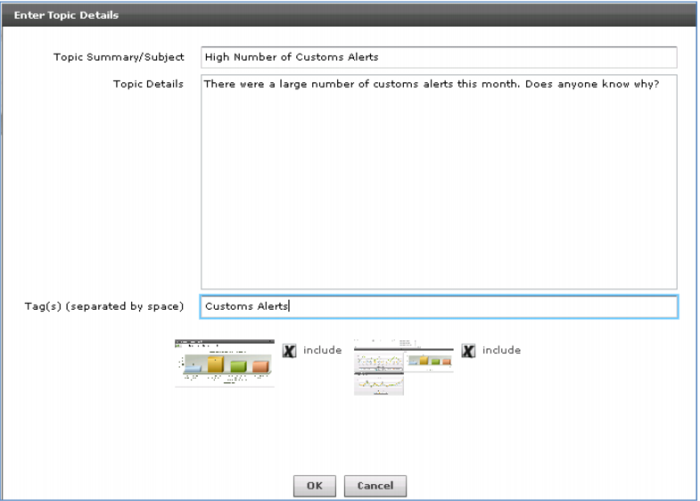
5. Click Post Topic
6. Enter Topic Summary / Subject High Number of Customs Alerts, Topic Details There were a large number of customs alerts this month. Does anyone know why?, Tags Customs Alerts
7. Click OK
8. (Optionally) Click Topic High Number of Customs Alerts
9. Click Post Comment
Key Points
• Multiple forums, Multiple posts per forum
o Scan existing topics
o Post new topic, Include screen capture
• Add comments to any topic
• Search option
Collaboration Icon
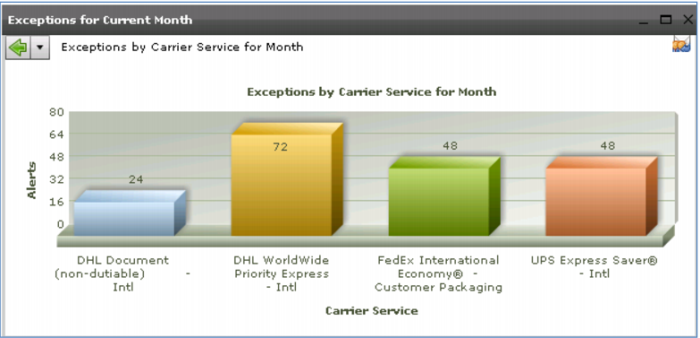
When you return to the Package Exceptions Summary dashboard, you will now see a collaboration icon on the graph. This indicates to anyone who looks at this dashboard that there is an on-going discussion about this issue. If they want to look at your comment or add one of their own, all they need to do is click the button.
Demo
1. Select Dashboard > QAD Standard > Transportation Management > Package Exceptions Summary
2. In Exceptions for Current Month, click Customs Issue
3. (optionally) click Collaboration icon
Key Points
• Collaboration icon
o Indicates active discussion
o Encourages collaboration
• Single click to review open discussion items