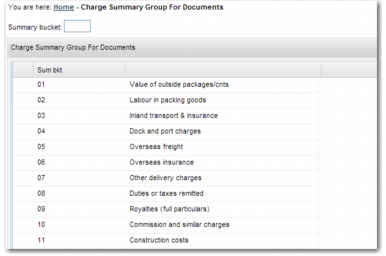
Charge Summary Group for Documents
Summary groups—option Y5—are used for categories of enumeration at the foot of certain invoices such as those from Canada, Gambia, Zambia, and Nigeria. The summary groups allow you to define the listed category into which costs fall. The parameters are used by certain invoice print programs to decide the category in which the cost is to be displayed.
Charge Summary Group for Documents
Typically, these documents require that all costs displayed in the body of the invoice are summarized in a predefined table at the foot of document. This table requires the value and currency for the cost category to be displayed and whether the cost has been included in the invoice total. Summary groups are for documentation purposes only and do not affect the calculation of charges.
To access this option, type Y5 in the QuickPath or choose System Settings|Base|Application Configuration|Documents|Charge Summary Group for Documents.
Summary bucket
Enter the code for this summary bucket.
Description
Enter a meaningful description of the charge summary group.
In the newly created summary bucket, you can maintain any number of Charge Summary Group Charges. Open the sub-option Charge Summary Group Charges and create new entries for the bucket.
Client, Summary Bucket
These fields are read only.
Charge Code
Select the relevant charge code to associate with this charge summary group.
In use
To include the code in the Summary Bucket, select this field.