Table Menu Options
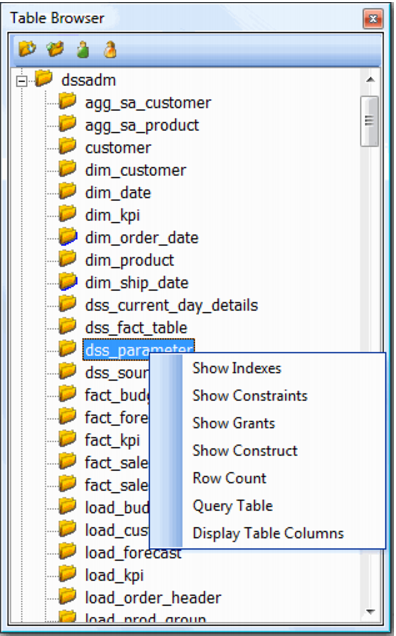
When positioned over a table or view in the tree structure the right mouse menu as shown below is available.
Show Indexes
Shows all indexes (and indexed columns) associated with the selected table in the results pane.
Show Constraints
Shows all constraints associated with the selected table in the results pane.
Show Grants
Shows all grants that have been made against the selected table in the results pane.
Show Construct
Shows a basic construct statement for the selected table in the results pane.
Row Count
Displays the number of rows in the selected table in the results pane.
Query Table
Performs a 'Select * from table_name;' statement where table_name is the name of the selected table. The results are shown in the results pane. This action can also be achieved by double clicking the left mouse button when positioned on the table name.
 TIP
TIP: Double clicking the left mouse button on a table name will issue a 'select *' statement against that table.
Note: If a table column is double clicked then the table is selected and ordered by the selected column. (i.e. the statement issued would be 'Select * from table_name order by column_name'.
Display Table Columns
Expands the tree structure to include all columns of the selected table.