Detail Fact Columns
The columns for a detail fact table are typically those of the staging table. Such fact tables typically contain a wide range of measures and attributes as well as the business keys used to look up the artificial dimension keys. These business keys should be included whenever possible as they provide a means of rebuilding the dimensional link. If size prohibits their inclusion it will probably be necessary to backup or archive all source data to ensure that the fact table can be rebuilt.
These fact tables normally contain a large number of attributes such as dates, which have not been converted to dimensions. Also contained would be information such as order numbers, invoice numbers etc.
See the first tutorial for an example of a fact table creation.
Rollup or Combined Fact Tables
Rollup fact tables are typically the most heavily used fact tables in a data warehouse implementation. They provide a smaller set of information at a higher level of granularity. These fact tables typically have a monthly granularity in the time dimension and reflect figures for the month or month-to-date. They often combine multiple analysis areas (detail fact tables) into one super set of information. This allows simpler comparisons or joining of otherwise isolated pools of information.
An example may be the combination of daily sales, weekly demand forecasts, and monthly budgets, into one rollup fact table. Such a fact table provides the ability to compare monthly or month-to-date sales against budget and forecast.
These rollup/combined fact tables may and often do contain different levels of granularity, as well as different sets of dimensions. For example it may be possible to look at sales and forecasts by promotion, but the budget information does not have a populated promotion dimension, so we will not get a budgeted value for the promotion.
Creating Rollup Fact Tables
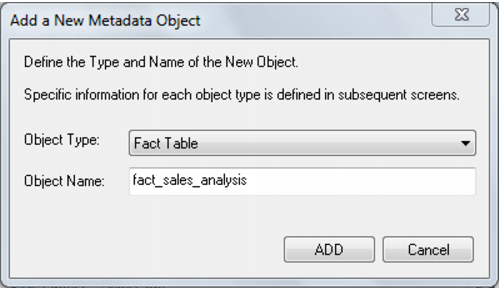
A rollup or combined fact table is typically created by dragging a fact table onto a fact table list. In the example screenshot below a double click on the Fact Table object group under the Sales project produced a list in the middle pane showing the existing fact tables. A fact_sales_analysis rollup fact table is being created after having selected the fact_sales_detail table in the right panel, holding down the left mouse button and dragging the table into the middle pane. The initial object create dialog will appear. Note that the name implies that this is a rollup fact table. The name will be changed to the one chosen above. A list of columns is displayed and those not required are deleted (everything except additive measures and dimensions).
Drag and drop additional columns from other fact tables into the middle pane if required. Where columns have the same name these will need to be changed. For example if we acquired a quantity column from fact_sales_detail and a column of the same name from fact_forecast we may choose to change the names to actual_quantity and forecast_quantity.
Once all columns have been defined:
1 create the table
2 edit the properties of the table and request that a new procedure be created.
Once OK is entered the dialog to create a template procedure will commence. Included in this process will be the definition of the date dimension granularity. Monthly rollup is the norm. To just combine fact tables with no rollup select the date dimension key as directed in the dialog. Other forms of dimension rollup will require some alteration to the produced template procedure.