Fact Tables
A Fact Table is normally defined, for our purposes, as a table with facts (measures) and dimensional keys that allow the linking of multiple dimensions. It is normally illustrated in the form of a Star Schema with the central fact table and the outlying dimensions.
The ultimate goal of the Fact Table is to provide business information to the end user community. In many cases, different types of fact tables are required to address different end user requirements. For simplicity the different types of fact table will be grouped together under the following headings:
Detail Fact Tables
A detail fact table is normally a transactional table that represents the business data at its lowest level of granularity. In many ways these tables reflect the business processes within the organization. Such fact tables are usually large and are focused on a specified analysis area.
There may be quite a large number of detail fact tables in a data warehouse implementation, of which only a few are used on any regular basis by the end user community. The disadvantage of such fact tables is that they provide isolated pools of information. Although joined by conformed dimensions, it is still often difficult to answer queries across the various analysis areas. They do however provide the ultimate drill down for all information and also the platform on which to build higher level and more complex fact tables. In terms of the time dimension detail fact tables are typically at a daily or even hourly granular level.
An example of a detail fact table may be the sales, or orders fact tables that have a daily granularity, and show all sales by product, by customer etc. on a given day.
Creating Detail Fact Tables
A detail fact table is typically created by dragging a staging table onto a fact table list.
In the following example screen the fact table list has been produced by double clicking on the Fact Table object group under the Sales project. A list is produced showing the existing fact tables.
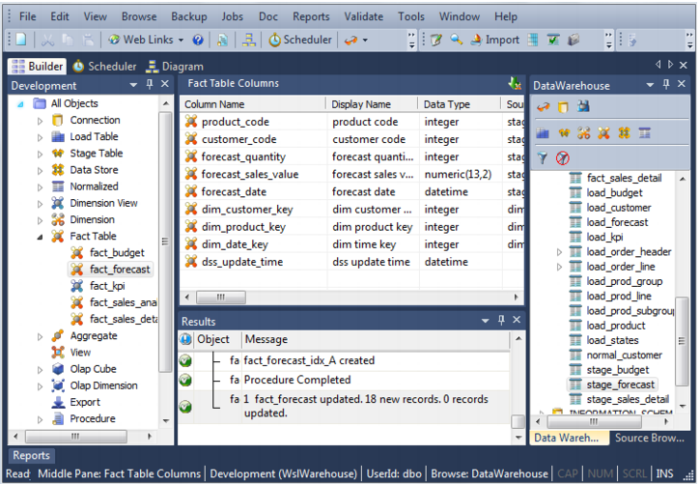
A fact_forecast detail fact table can be created by selecting the stage_forecast name in the right pane of the builder window, holding down the left mouse button and dragging the table into the middle (fact table list) pane. Once released, the dialog to create the fact table will commence.
When a staging table is dragged into the list window (middle pane) all fact tables are by default detail fact tables. If manually creating a table, then the table type can be selected under the Properties of the fact table.