Define each KPI
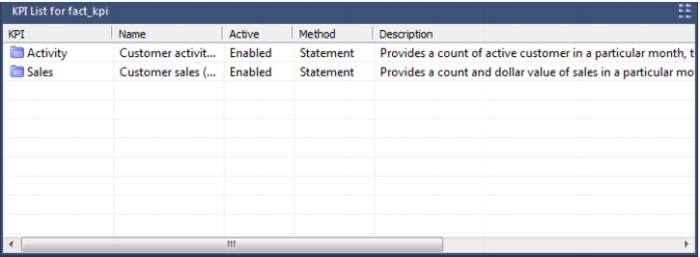
Once the procedure has successfully compiled we are ready to start setting up each of the KPIs. Right mouse on the KPI table name to get the popup menu. This menu is similar to the other fact table menus except for the additional options to display and add KPIs. A display of the KPIs will list any KPIs that are currently defined. The result set is as appears below:
The ‘Id’ is the same unique identifier that will be found in the kpi dimension. The Name is a name entered in the properties of the KPI and does not relate to the dimension in any way. The Active flag indicates if the KPI will be processed when the ‘Update’ or ‘Process’ menu options are selected. Each KPI can be defined as a SQL Statement, a Procedural Block or a Procedure. The current method used to update the KPI is one of these three and is displayed under Method. The description is a comment or description field entered in the properties of the KPI and in no way relates in the KPI dimension.
A right mouse button anywhere in the List Window will allow a KPI add. If a right mouse button is depressed while positioned over the ‘Id’ then a menu popup will provide options to copy, modify, delete, add and view the KPI statement.
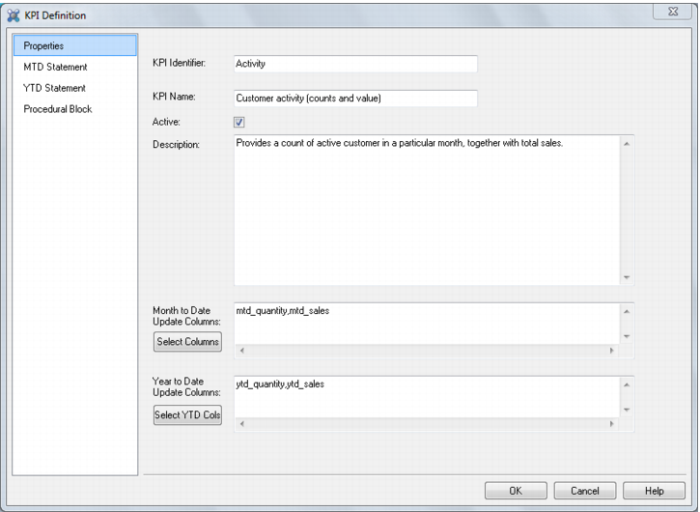
When the add KPI option is selected a properties window will appear, as shown below. The id and name fields are required. If the active button is checked the procedure will be enabled for update.
The ‘Select Columns’ button allows the selection of the columns that this KPI will update during the month to date update pass. The date and KPI dimensions will be updated for you so are not provided as choices. The only choices provided are the ‘Month to date measures’ and the other ‘Dimensions’. Select those measures and dimensions that will be updated. All non selected measures and dimensions will be set to their default values. The resultant choice is shown in the Update Columns window. This window should only be updated via the ‘Select Columns’ button.
Once these initial values are defined the ‘Statement’ tab can be selected to define the update SQL statement. If a procedural block or procedure is required for the update (i.e. too complex for a single SQL statement) then select the Procedural Block tab.