The KPI Statement
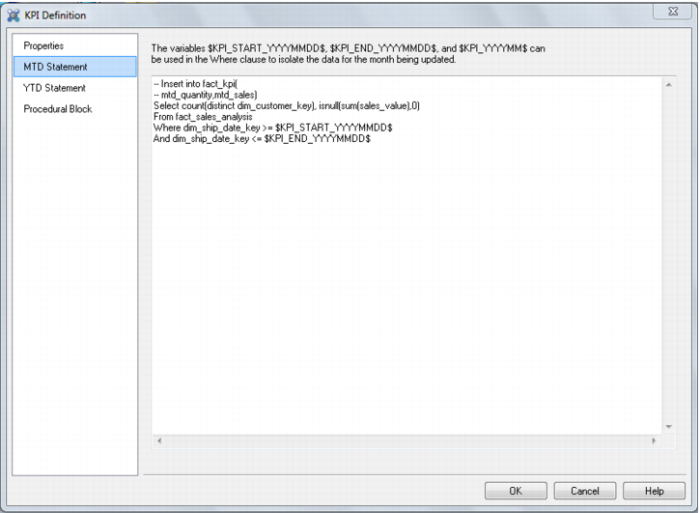
The ‘Statement’ tab presents an edit window that allows the input of a select statement that will return the values for the columns being updated. It must return the values for the columns selected in the properties tab in the order shown in the ‘Update Columns’ window. An example of a completed Oracle KPI statement follows:
The first two lines are comments inserted (when modifying) to provide a reminder of the columns and order required by the select statement. Anything prior to the initial select statement is ignored.
The statement must make use of at least one of the variables provided to select the appropriate period. This variable will be replaced with the values for the period being updated at run time. These values are derived from the start and end parameters defined for the KPI fact table.
In order to group by the non selected columns and any attributes etc.QAD Data Warehouse Designer must be able to break this statement into its component Select, From, Where, Group By, and Having components (where present). If a complex statement is used that has more than one of these key words then the primary one must be in UPPER case. For example if a sub query is being used then the main SELECT and FROM key words must be in upper case and must be the only occurrence of these key words in uppercase. QAD Data Warehouse Designer will check and issue a warning if it is unable to resolve the main key words.
To facilitate the testing of a statement there is a ‘View statement’ option when you right mouse button on the KPI Id. This will provide a window with the full statement with the default columns inserted and the parameters converted. This statement can be cut and run in Sql Admin (shipped with QAD Data Warehouse Designer) or in a database specific utility for testing.