Transformations
Standard
column transformations (on page
570) can be used in QAD Data Warehouse Designer to perform calculations, change data types or format data.
Re-using complex transformations can save a significant amount of time. These can be achieved in two ways with QAD Data Warehouse Designer:
Database Functions
QAD Data Warehouse Designer Re-usable Transformations
Column Transformations
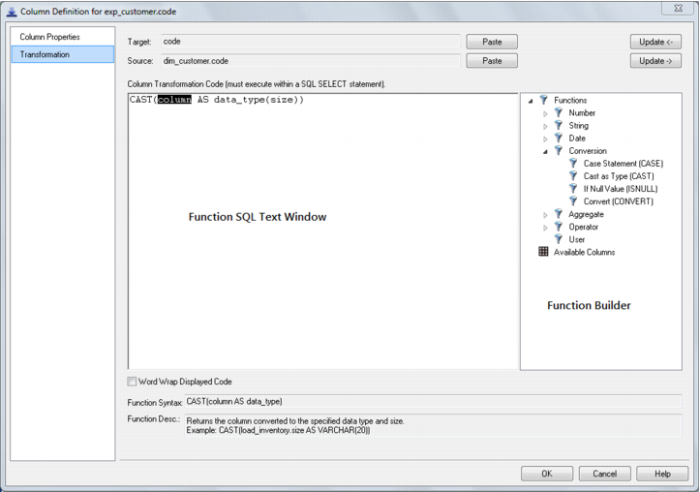
Each table or export object column can have a transformation associated with it. For all table types, except for load tables, the transformation will be included in the generated procedure for the table. These are executed as part of the procedure update. The transformation must therefore be a valid SQL construct that can be included in a 'Select' statement. For example, we could have a transformation of 'load_order_line.qty * 0.125' to calculate a tax column of 12.5%. Click the 'Transformation' tab on the column properties to enter a transformation.
Note: Transformations added to an existing table that have an update procedure are only put into effect when the procedure is re-generated and re-compiled.
Column transformations on load tables are more complex, due to the unique nature of load tables. See
Load Table Column Transformations (on page
573) for more details.
Dimension View transformations are included in the Database Definition Language (DDL) that creates the view in the database. Any changes to Dimension View column transformations require the view to be dropped and recreated.
Export object column transformations are dynamically applied for file exports. If the export object is executed via a host script, then the script needs to be regenerated for changes to transformations to take effect.
Column Transformation Properties
An example below shows the transformation property screen with a simple transformation:
The two special update keys allow you to update the column and step either forward or backward to the next column's properties. ALT-Left Arrow and ALT-Right Arrow can also be used instead of the two special update keys.