Example
The following 'after' transformation set for the column code in the table load_product
lpad(code,5,'0')
would result in the following SQL statement being executed after the load:
update load_product set code = lpad(code,5,'0');
Database Functions
Database functions can be created in the data warehouse database (as procedure objects in QAD Data Warehouse Designer) and used in column transformation in QAD Data Warehouse Designer. See the Oracle and SQL Server documentation on functions and
Procedures and Scripts (on page
587) for more information on creating functions inside QAD Data Warehouse Designer.
Re-usable Transformations
QAD Data Warehouse Designer Re-usable Transformations allow a complex SQL transformation using standard database functions (including User Defined Functions) to be built once and reused in multiple column transformations. Functionality is included to manage and propagate changes to re-usable transformations.
Creating a New Re-usable Transformation
New re-usable transformations are created from the Tools/Define Re-Usable Transformations menu.
Creating a new re-usable transformation is a three step process:
Specify the name of the transformation
Enter metadata for the transformation
Define the transformation
Specify the Name of the Transformation
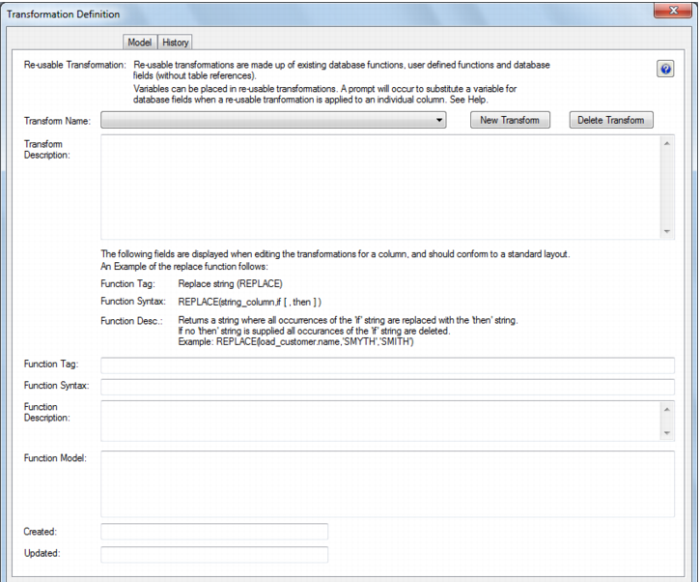
After selecting Define Re-Usable Transformations from the Tools menu the following dialog is displayed:
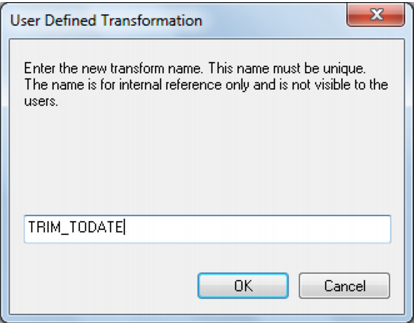
Click New Transform and enter a name for the re-usable transformation:
Note: This is the internal QAD Data Warehouse Designer name for the transformation, not the name developers reference when utilizing the transformation on column transformations.
Click OK.
Enter Re-usable Transformation Metadata
Enter the following metadata for the transformation to describe the transformation for developers.