Configuring QAD CRM on Deployment Server
Compiling Encrypted Files
QAD CRM supports the following three scenarios:
• QAD CRM Without Integration with QAD Enterprise Applications
• QAD CRM Integrated with QAD Enterprise Applications (Standard Edition)
• QAD CRM Integrated with QAD Enterprise Applications (Enterprise Edition)
QAD CRM Without Integration with QAD Enterprise Applications
Compiled programs with ISO databases (
.r code) are shipped with the product. If you are using QAD CRM with OE11.6 and an ISO database in a stand-alone configuration, then you can skip directly to the section
Configuring the Delivery Server. Otherwise, go to the section
Compilation Procedure and implement the steps.
QAD CRM Integrated with QAD Enterprise Applications (Standard Edition)
1 Rename the file QADCRMInstallDir\system\psys0101.i; for example, you can rename the file to psys0101.i.org.
2 Copy psys0101.i from QADCRMInstallDir\integration\eb21 to the folder QADCRMInstallDir\system.
QAD CRM Integrated with QAD Enterprise Applications (Enterprise Edition)
1 Rename the file QADCRMInstallDir\system\psys0101.i; for example, you can rename the file to psys0101.i.org.
2 Copy psys0101.i from QADCRMInstallDir\integration\eb3 to the folder QADCRMInstallDir\system.
3 Copy proxy.pl provided with QAD Enterprise Applications to QADCRMInstallDir\mfgsrv.
Note: If you are using QAD Enterprise Applications on Progress Open Edge 10.x, copy the 32-bit version of proxy.pl from QADERPInstallDir/fin to QADCRMInstallDir\mfgsrv. The Progress 32-bit version of the proxy.pl file can be acquired from the QAD Enterprise Applications Enterprise Edition installation media. From the installation media, extract the mfgproap32/mfgproap32.zip file, which contains 32-bit proxy.pl, to QADCRMInstallDir\mfgsrv.
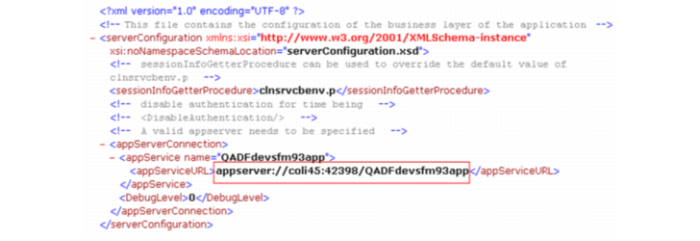
4 Open cbserver.xml under QADCRMInstallDir\integration\mfgpro in Notepad and modify appServiceURL with QAD Enterprise Applications Financials AppServer details. In the following example, col45 is the AppServer host name, 42398 is the NameServer port number, and QADFdevsfm93app is the QAD EE Financial AppServer broker name.
Compilation Procedure
1 Create a word break rule file for the CRM Unicode databases (Unicode Environment only).
a Start a command window (cmd.exe) and set the DLC and PATH variables.
set DLC=ProgressInstallDir
set PATH=%PATH%;%DLC%;%DLC%\bin
b Change the current directory to the Progress installation directory.
cd %DLC%
c Compile the new word break rule file using the following command.
proutil -C wbreak-compiler %DLC%\prolang\convmap\utf8-bas.wbt 1
d Double check that the file created in the previous step named proword.1 now exists in the %DLC% folder.
2 Modify the parameter file.
For a Unicode environment, you must perform the following additional steps:
a Update or add the following parameter values in QADCRMInstallDir\qadsfamaupgrade.pf:
-cpinternal UTF-8
-cpstream UTF-8
-cpcoll ICU-UCA
-cpcase Basic
b For Unicode compilation, modify qadsfamaupgrade.pf to connect to the Unicode databases in the QADCRMInstallDir\db\demo\unicode folder; for example:
-db db\demo\unicode\bisgmenu -1
-db db\demo\unicode\bisgen -1
-db db\demo\unicode\dataexch -1