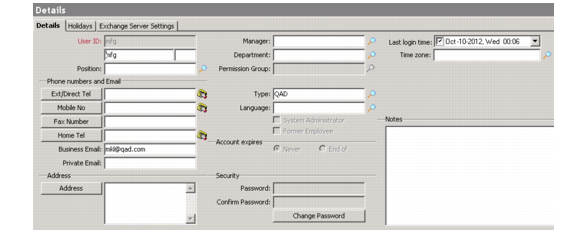
Recording Personal Details
Use the Details screen to maintain your work profile—personal details and contact information, permissions group, and so on.
You also can use this tab to change your password; for details see
Changing Your Password.
1 Choose Sales Management|My Settings|Details or Marketing Management|My Settings|Details. The Details screen displays.
Details
2 Enter your position and time zone information as required. This information is used in certain components such as the CSR module and for profiles of internal contacts.
Position
Enter a position defined in the system.
Manager
Enter the name of your manager defined in the system.
Department
Enter the name of the department you belong to.
Permission Group
If permission groups are defined in your system, enter the group you belong to.
Time Zone
Enter the time zone of the location in which you work.
3 Enter your phone number, e-mail, and address information as required.
4 Enter any additional information as required.
Type
Enter a position defined in the system.
Language
Enter the language you will use in the organization.
System Administrator
Select this option to indicate you are authorized to perform system administration duties. This field is available only for users assigned system administrator-level privileges.
Former Employee
This check box is for administrator use.
Account Expires
Indicate your account expiration details.
Never. Select this option to indicate your account will remain valid indefinitely.
End of. Select this option to display a calendar for selecting the date on which your account expires.
6 Enter your holiday information as required. For details see
Holidays.