Sending Quotes to Enterprise Applications
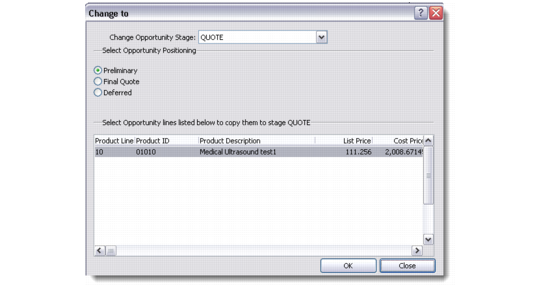
When an opportunity is advanced to stage Quote using the right-click menu option Advance Opportunity Stage, any selected item lines are sent automatically to QAD Enterprise Applications and created as a quote in Sales Quote Maintenance.
Change Opportunity Stage
This operation will only occur if item lines are selected. If no lines are selected, then no quote is created in Enterprise Applications. However, if line items are later added in the Quotation stage of the opportunity, this will also trigger the creation of the quote in Enterprise Applications.
Adding lines to a quote in CRM that has already been sent to Enterprise Applications will result in the addition of those lines to the sales quote in Enterprise Applications.
If the customer corresponding to the CRM profile does not exist in Enterprise Applications, then the customer can be automatically created. This behavior can be disabled for the system in the ERP Integration Settings function if considered undesirable from an implementation standpoint.
At the end of this process the Reference field on the Opportunity Detail screen will be set to the value of the sales quote number assigned in QAD Enterprise Applications.