Sending Sales Orders to Enterprise Applications
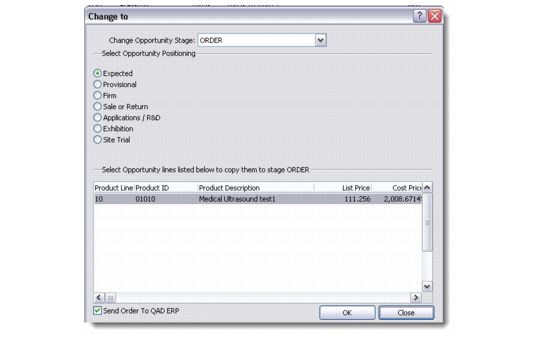
When an opportunity is advanced to stage Order using the right-click menu option Advance Opportunity Stage, any selected item lines can also be sent to QAD Enterprise Applications and created as an order in Sales Order Maintenance.
The Send Order To QAD ERP field at the bottom of the frame gives the user the option to not send a particular order to Enterprise Applications. If the user chooses not to send the Opportunity to Enterprise Applications at this moment, they can do so later by using the Send to QAD ERP option from the right-click menu on the Order tab.
Change Opportunity Stage
If the customer corresponding to the CRM profile does not exist in Enterprise Applications, the Customer can be automatically created by the change opportunity stage function. This behavior can be disabled for the system in the ERP Integration Settings function if considered undesirable from an implementation standpoint.
As with the sales quote, the sales order creation process requires values for fields not maintained on the opportunity record in CRM. In creating the sales order, the integration uses the default values stored in the sales quote template record.
The Reference field on the opportunity detail screen will be set to the value of the sales order number assigned in QAD Enterprise Applications.
Once an order has been sent to Enterprise Applications, updates in CRM will no longer be replicated to the Enterprise Applications sales order. Sending the sales order to Enterprise Applications is an effective handover of responsibility for the management of the sales order from CRM to Enterprise Applications.
However, subsequent updates on the order created in Enterprise Applications will be transferred back to CRM. Most notable here are the shipped and invoiced quantities on the order lines. When the order is invoiced from Enterprise Applications, the CRM opportunity will be advanced to the stage Invoiced.