Deleting Sales Quote Lines in QAD CRM
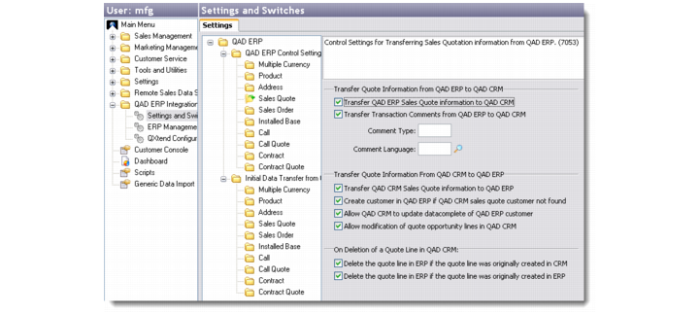
Deleting sales quote lines in QAD CRM can have different effects when you synchronize CRM with QAD Enterprise Applications. Sales quote lines with different origins—those originally created in QAD CRM and those originally created in QAD Enterprise Applications—are treated differently in QAD CRM. Use two sales quote settings to control how sales quote data is synchronized when a sales quote line is deleted from QAD CRM, both for local and remote data synchronizations.
Sales Quote Settings
Delete the quote line in ERP if the quote line was originally created in CRM
Select this option to delete the corresponding record in QAD Enterprise Applications when you delete a sales quote line originally created in QAD CRM; clear this option to retain the corresponding record in QAD Enterprise Applications on deletion of a sales quote line from CRM.
Select this option only if the Transfer QAD CRM Sales Quote Information to QAD ERP option is selected.
When this option is selected, if you delete a sales quote line but deletion of the corresponding record in QAD Enterprise Applications fails, the system restores the deleted sales quote line in QAD CRM and records the error. You can view the error details in the log file by right-clicking and selecting View Error Log from the menu.
Delete the quote line in ERP if the quote line was originally created in ERP
Specify whether to delete the corresponding sales quote line in QAD Enterprise Applications on deletion of a sales quote line originally created in QAD Enterprise Applications and synchronized to QAD CRM; clear this option to retain the corresponding record in QAD Enterprise Applications on deletion of a sales quote line from CRM. Clearing the option precludes situations in which you delete a sales quote line created in QAD CRM and a different sales quote line created in QAD Enterprise Applications that happens to have an identical ID number gets deleted by accident during data synchronization.
Select this option only if the Transfer QAD ERP Sales Quote Information to QAD CRM option is selected.
When this option is selected, if you delete a sales quote line but deletion of the corresponding record in QAD Enterprise Applications fails, the system restores the deleted sales quote line in QAD CRM and records the error. You can view the error details in the log file.
Important: These settings only apply to sales quote line deletions but not opportunity or sales quote deletions. When you delete an opportunity or a sales quote (as opposed to a sales quote line) from QAD CRM, the system always deletes related sales quote lines in QAD CRM only and retains corresponding records in QAD Enterprise Applications.
When you delete a sales quote line in QAD CRM and reprice the quote, best pricing will only be applied to sales quote lines originally created in QAD Enterprise Applications but not to those originally created in QAD CRM.