Attaching Profiles to Nodes
You can attach profile records to remote nodes from this module. This option is useful for data synchronization purposes, especially in a scenario where an organization has multiple branches spread across various geographical locations.
1 To send profile records to a remote node, select the required profiles from the browser list.
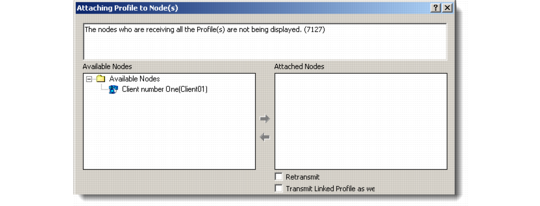
2 Right-click and choose Send to Remote Node from the menu. Alternatively, choose the Send to Remote Node option from the File menu. The Attaching Profile to Node(s) window displays.
Attaching Profile to Node(s)
3 Use the arrow keys to move selected nodes between the Available Nodes and Attached Nodes boxes.
4 Select the Retransmit or Transmit Linked Profile As Well check boxes as required and save your selection.
You can check for the profiles that you attached to the remote node in Data Synchronization|Remote Node Setup. For more details about data synchronization, see QAD Customer Relationship Management Administration Guide.