Maintaining Product Lines
A product line is a user-defined category that groups products that are similar. For example, you can create an Audio-Video product line to group individual products such as audio and video cassettes, compact disks, digital video disks, and so on.
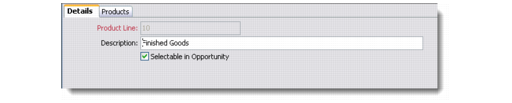
Use the Product Line Details screen to maintain information relating to a specific product line. Use the Products tab to maintain the products associated with the product line.
You also can define details for individual products; for details, see
Maintaining Products.
1 Choose Sales Management|Products|Product Line or Marketing Management|Products|Product Line. The Product Line browser displays the product lines currently defined in the system.
2 Right-click the Product Line browser and choose Add from the menu.
Note: This menu also contains other options for maintaining product lines.
Product Line Details
Product Line
Enter a unique code for the product line.
Description
Enter a description for the product line.
Allow Selection as Brochure/Sample
Not currently used.
Selectable in Opportunity
Select this option if the product line should be available for selection in the Opportunity module.