Details Tab
You can use the Details tab to record basic information about a new De-Dupe.
De-dupe Name
Enter the title of the duplication details you are specifying in the De-Dupe Name field. The title should indicate the purpose or type of the De-Dupe; for example, Profiles with the same Profile name.
Selection Criteria
Click Selection Criteria to open the Generate where clause window. In this window, you can define conditions to narrow the search scope by setting search operators.
Example: You want to find duplicate profile records in the US. Set “Country is (exactly) US” as a search operator and click Append to add it to the WHERE Criteria area.
Other Options
• Click Delete to delete the selected search operator in WHERE Criteria area.
• Click Update to update the selected search operator in WHERE Criteria area.
• Specify a custom search operator in Progress 4GL in the Enter Valid Progress 4GL Statements area.
• Click Check Syntax to check whether the syntax for the search operator is correct.
Select Fields
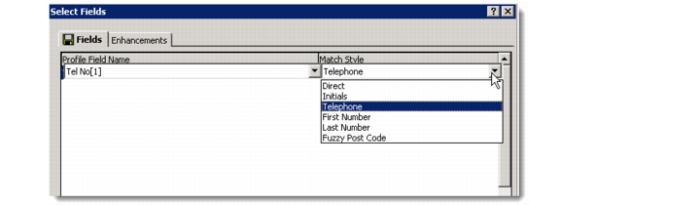
Click Select Fields to open the Select Fields window. Specify the fields based on which duplicate records you want to locate.
The Select Fields screen consists of the Fields and Enhancements tabs.
Fields Tab
To specify search operators for fields using the Select Fields window:
1 Right-click the Profile Field Name area and choose Add.
The drop-down lists for Profile Field Name and Match Style become active.
2 Select a field name and specify a match style for it.
For example, to find records that have a duplicate profile name, select Profile Name from the Profile Field Name list and select Direct from the Match Style list.
Note: You can select multiple fields to make the search more specific.
Match Styles explains how each operator works.
Match Styles
Match Style | Description |
Direct | As is |
Initials | This operator looks at the start of each separate character or word within the specified field and performs a direct match type operator on the results. For example, I.B.M will return IMB. Similarly, Progressive Software India Ltd becomes PSIL. |
Telephone | This operator removes all the special characters from the specified field value. For example, (44) 7912398765 becomes 7912398765. |
First Number | This operator considers only the first number. For example, (011) 24535 is converted to 011. |
Last Number | This operator considers the last number only. For example, (011) 24535 is converted to 24535. |
Fuzzy Post Code | This operator performs a simple comparison after the following conversions:
- 1 to the letter I
- 0 to the letter O
- 8 to the letter B
- 5 to the letter S |
3 Click Save. The Sample Data area is updated to list some duplicate records with the same name.
Enhancements Tab
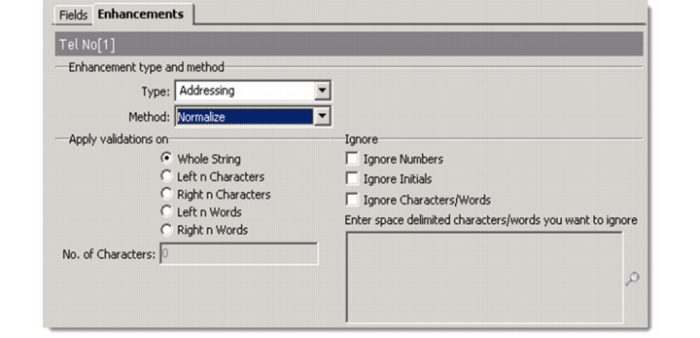
The Enhancements tab allows you to add more attributes to the matching criteria for a De-Dupe record.
Type
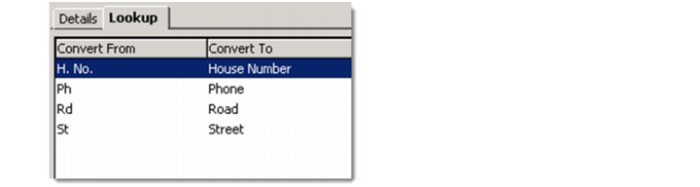
Each type has an associated Lookup table. Each Lookup table maintains a list of Convert From and Convert To values. The system replaces the values during matching. How the system replaces the values depends on the method you choose.
The following image shows the Lookup values for Addressing.
Each Lookup table maintains two fields: Converted From and Converted To. For some types, the system copies the default data. You can also create, modify, delete, or import Lookup values.
To access the Lookup values, go to Settings|Lookup Values on the left navigation pane on the CRM Web Client.
The following table shows the associations of Type with Lookup table.
Type | Lookup table |
Addressing | 716 |
Business | 717 |
Countries | 718 |
Qualifications | 719 |
Weights/Measures | 720 |
Numbering | 721 |
Job Title | 722 |
Salutation | 723 |
Fore Names | 724 |
Dates/Events | 725 |
Miscellaneous | 726 |
Method
There are two methods:
Normalize: Replaces Converted From values with Converted To values.
Exclude: Replaces Converted From values with blank values.
Apply validations on
Options include:
Whole String: Matches as is.
When you choose any of the following options, you are required to enter a number in the No. of Characters field. The number here decides the maximum number of characters/words for the system to match.
Left n Characters: Uses the first n characters for matching.
Right n Characters: Uses the last n characters for matching.
Left n Words: Uses the first n words for matching.
Right n Words: Uses the last n words for matching.
Ignore Numbers
Ignores numeric data during matching.
Ignore Initials
Removes the first word before the symbol “.”. For example, A.Jones is converted to Jones. A.Jones and S.Jones are considered as duplicates.
Ignore Characters/Words
Characters or words are excluded from the data during matching.
Access Control Settings
You can control access to the De-Dupe records based on team assignments. Only users who are assigned to the specified team can access the records. The De-Dupe ID is a system-generated ID that works as a unique identifier for the De-Dupe record.