Building a Target List Using Search Criteria
Using the Build Target List option on the right-click menu, you can define search conditions, and then automatically search either the profiles or contacts that are defined in your system to build a target list for either an inclusion or exclusion list. You can then modify the target list as required.
Note: You also can use the Build Target List dialog box to import your list of targets from one inclusion list (or exclusion list) to another list of the same type.
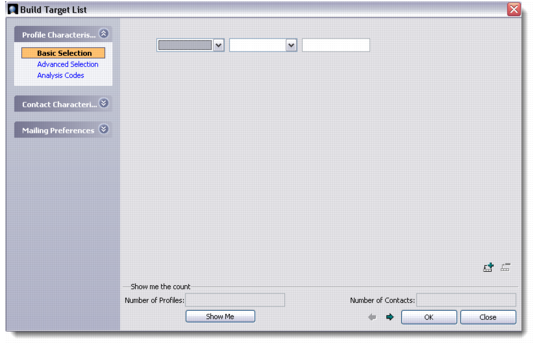
To display the Build Target List dialog, right-click the Targets browser and choose Build Target List.
Note: The right-click menu also provides other options for targets, such as sending e-mails or letters, or viewing an associated profile. You also can edit targets—for example, to modify the number of literature items to be sent to a target.
Build Target List
Profile Characteristics
Choose an option to define search characteristics for profiles defined in your system.
Basic Selection. Select a field on the profile and then select an operator. Specify a value.
Advanced Selection. Define your search criteria as required using field names, conditions, and values. If required, enter parentheses using the drop-down listbox to specify the order in which the search criteria conditions will be evaluated. You can append, delete, and update search criteria.
You also can enter Progress 4GL statements into the text field. If using this method, click the Check Syntax button to verify that your statements are correct.
Analysis Codes. Define your search criteria using analysis groups or codes. You can search for profiles that use any or all of the groups you specify.
Contact Characteristics
Select a characteristic to define search criteria for contacts defined in your system. Contact Characteristics has an additional option to the ones described above.
Communication Channels. Select a communication channel. If required, indicate if one of the channels is the preferred method of communication.
Mailing Preferences
Using the arrows, move inclusion lists or exclusion lists from the Available listbox into the Selected listbox. Click OK to import the targets defined for those inclusions or exclusions into the list selected in the listbox.
Show Me
Displays the total number of profile and contact records that comply with the specified selection and filtering criteria. Use the displayed values to either narrow or expand your selected criteria to target the identified market segment more efficiently.
After defining your criteria, click OK to build your target list. The Target browser is populated with the search results.