Maintaining Service Issue Status
An issue is managed according to its status, which relates to the issue’s position in its life cycle. Is the issue active, pending, an emergency, or closed? Issues are moved from status to status manually by a CSR.
You can set up as many status definitions as you need. It is recommended that you keep the issue life cycle simple.
Issue status codes are user defined and can take any format an organization chooses. Some service organizations prefer numerical status codes or abbreviations. Others use more intuitive names.
For example, when a new issue comes in, its status can be OPEN. Later, when an engineer is assigned to the issue, the status becomes ASSGND. When the problem is resolved, the issue status is CLOSED.
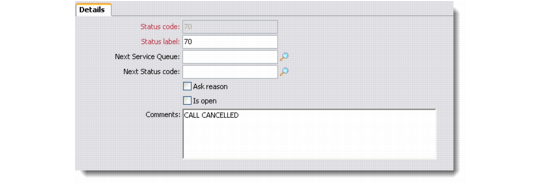
Use the Issue Status Maintenance screen to define issue status settings for service issues.
Issue Status Maintenance - Details Tab
Status Code
Enter a unique name identifying this issue status. Making the name recognizable can help users quickly identify its purpose.
Next Service Queue
Specify the next queue to which the system should route issues with the next status. This field is for reference; you can use it when setting up escalations.
Next Status Code
Specify the next status that normally follows this status in the issue life cycle. The next status specified here provides a default when the status of an issue is modified.
Ask Reason
Select this option to cause the system to display a dialog box that lets a CSR record the reason for the issue status change.
Is Open
Select this option to cause service issues assigned this status code to display as open in the Issue Management module.
Comments
Enter any description required.