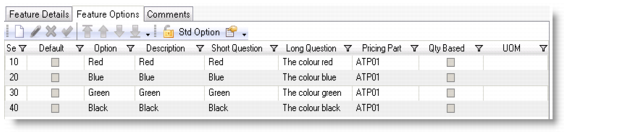
Feature Options
Feature options inherit from the options of the selected variable. To include a variable option as a feature option, select its check box on the left and then clear the check box to exclude it from the feature options.
If you set the Use Standard Options option to Yes for the current group in Master Group Maintenance, you can only use variable standard options as feature options. If you set this value to no, you can modify the variable standard options for the feature or add new options.
Feature Options List
If you click the Standard Options button on the toolbar, only the variable options are available for this feature. You cannot exclude any of the variable options or add new options for this feature. Click this button again if you want to modify the standard variable options for the feature.
You can set default values for features, and then default values are on the Questionnaire. But the questions on the Questionnaire are not answered automatically. To automatically answer the questionnaire, click the Answer All button to answer all the questions using their default options.
Note: Besides setting the default values in Feature Maintenance, you can also define default values using rules in General Rule Maintenance.
Similar to Variable Options, Feature Options also supports multiple languages. You can specify short and long answers in any of the QAD supported languages. The short answer can be up to 64 characters in length. You can also translate the answer from one language to another. Click the String Translation button, and enter the translation on the String Translation screen. If the translation is already set up in Variable Options|String Translation, you can see the translation here in Feature Options|String Translation and change the translation for the feature.
You can also use Feature Option Language Browse to display the feature option answers that you have set up for each language.
Note: When you click Save in Feature Options|String Translation, the system:
• saves the updated record, and
• creates feature translation records for all the languages that have been set up for the variable but not the feature.
If you do not set up the translations in Feature Options, the questionnaire displays the translated records that you have set up in Variable Options. In other words, the system uses the following defaulting logic to display translated records for the questionnaire:
• When Standard Options is set to Yes:
• If the translation has been set up in Variable Options, the system takes the translation from there.
• Otherwise, the system has no translated records to display.
• When Standard Options is set to No:
• If the translation is set up in Feature Options, the system takes the translation from there.
• If the translation is not set up in Feature Options but has been set up in Variable Options, the system takes the translation from there.
• Otherwise, the system has no translated records to display.