Pricing: Use Pricing With Pricing Rules
You can compose pricing rules for text, date, logical, and element type variables. A pricing rule is a special type of rule that sets the value of the attribute pricing_qty of a feature. Use pricing rules to set quantity for non-numeric features. In these rules, the right side of the THEN, ELSE, or ASSIGN statement does not contain an option. Instead, they contain a numeric feature or a formula that yields a numeric value.
Exercise 34: Pricing with Pricing Rules
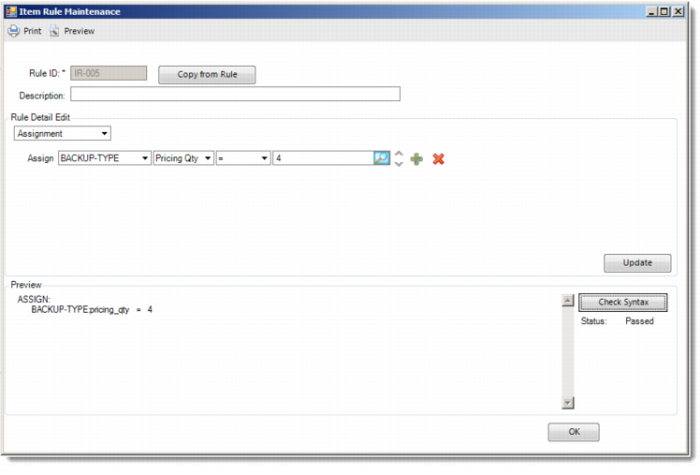
Now create a pricing rule for the batteries (items 60021, 60022 and 60033). In the generic product structure of 01040 each battery has a product structure quantity of 4. In other words, when a battery is selected in the questionnaire, the price of four batteries is added to the configured price.
Run Item Rule Maintenance and enter the following rule.
Item | Rule ID | Rule |
01040 | IR-005 | Assign backup-type:pricing_qty = 4 |
Start the Configuration Analyzer and analyze item 01040.
Now run Configuration Questionnaire for item 01040 and select New Configuration.
Answer the questions for backup and battery type.
• The batteries have a pricing quantity of 4.
• The option N.A. does not have a linked pricing part and therefore does not have a price.