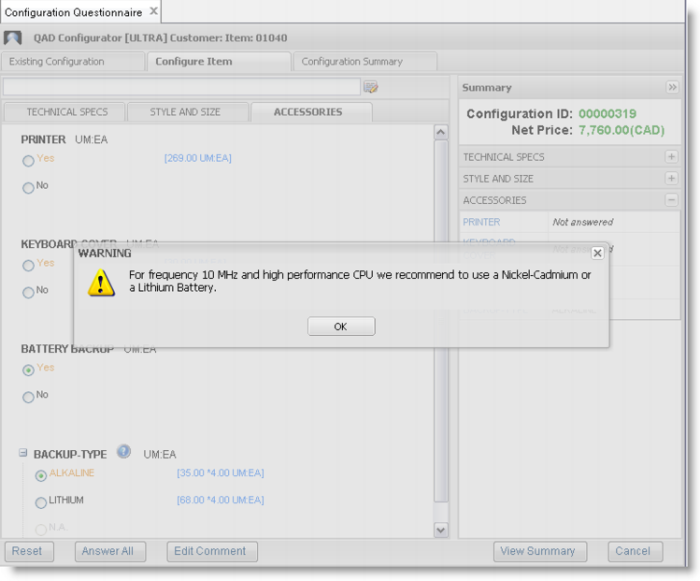
Displaying Warning Messages in the Questionnaire
When constructing sales configuration rules, you can define warning messages to display when a particular rule condition is met during the questionnaire entry process.
To define a warning message:
1 Define a logical type variable.
2 Create a sales configuration rule and assign the following function to the logical variable:
showMessageBox(title, message)
Where title is the title of the warning message box and message is the warning message you want to display.
You can enter the message box title and the message in any of the QAD supported languages.
Example: You define a message and the message box title in Chinese.
Define Message in Chinese
Then when the Chinese questionnaire respondent uses the questionnaire, the system displays the message box title and the message in Chinese.
Message Shown in Chinese
3 Attach the rule to an item. When the system processes the rule in the questionnaire, a warning message appears.
Exercise 39: Warning Message in the Questionnaire
Run Variable Maintenance and create the following variable.
Variable | Data Type | Extent | Functional Group | Question Type | Short Question | Question/ Temporary |
mess-var | Logical | 1 | Technical Specs | Normal | mess-var | Temporary |
Run Feature Maintenance and assign this variable to configurable item 01040.
Run Item Rule Maintenance and enter the following rule.
Item | Rule ID | Rule |
01040 | IR-006 | If freq = “10MHz” and CPU = “high” and backup-type = “Alkaline” then mess-var = showMessageBox (“WARNING”, “For frequency 10MHz and high performance CPU, use a Nickel-Cadmium or a Lithium Battery.”) |
Now run the Configuration Analyzer for item 01040.
Run the questionnaire for item 01040 and select New Configuration.
Select Frequency equals 10MHz, CPU equals high, and Backup Type Alkaline. The system displays the warning message “For frequency 10MHz and high performance CPU, use a Nickel-Cadmium or a Lithium Battery.”
Note: The warning message does not prevent the user from continuing.