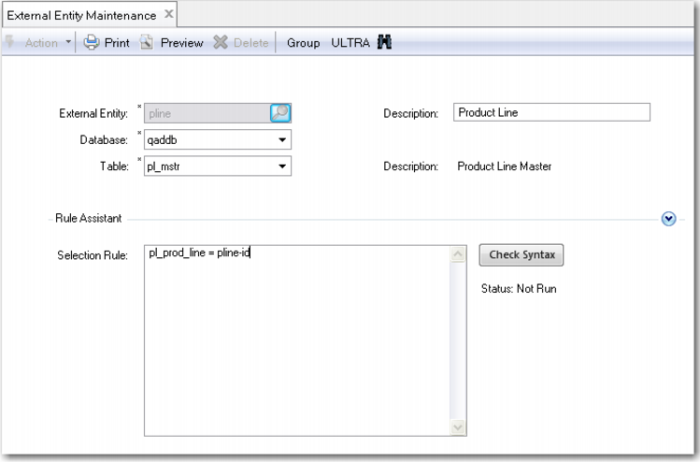
External Entity Maintenance
This function allows you to select specific information from the QAD EA database or from the QAD Configurator database or any other connected database and to use it in the questionnaire. An external entity is a reference to a record in the database. After defining an entity, you can create a variable of the type element, and link this variable to the external entity.
Exercise 42: External Entity Maintenance
Suppose that you want to show the ID and description of the product line of that item on the questionnaire.
Find the description of the product line in the field pl_prod_line of the pl_mstr table in the QAD EA database. You cannot access the pl_mstr table in QAD Configurator. So you define an external entity.
Once the database and the table are determined, you need a selection rule to select the correct record. In this example, select the record where pl_mstr.pl_prod_line equals the product line number of the Industrial Ultrasound.
To specify the selection rule, you need another variable in which you store this product line number. This variable must be of the type element and must refer to the configurable item and to the product line field.
First run Variable Maintenance and define the following variable.
Variable | Data Type | Extent | Functional Group | Short Question | Question / Temporary | Question Type |
pline-id | Element | 1 | Technical Specs | Product Line ID | Question | Special |
Enter the following values on the Data Format Tab.
Variable | Element Type | Entity | Field |
pline-id | Internal | Configurable Item | pt_prod_line |
Now run External Entity Maintenance and enter the data as follows.
External Entity | Database | Table | Selection Rule |
pline | qaddb | pl_mstr | pl_prod_line = pline-id |
Note: You can use the Rule Assistant to enter the selection rule.
The next step is to run Variable Maintenance and add the following variable.
Variable | Data Type | Extent | Functional Group | Short Question | Question / Temporary | Question Type |
pline-desc | Element | 1 | Technical Specs | Product Line | Question | Normal |
Enter the following values on the Data Format Tab.
Variable | Element Type | Entity | Field |
pline-desc | External | pline | pl_desc |
Finally use Feature Maintenance to add the new variables to the Industrial Ultrasound.
Item | Feature |
01040 | pline-id |
| pline-desc |
Now run the Configuration Analyzer for item 01040.
Run the questionnaire for item 01040 and select New Configuration. See the product line description that is displayed on the questionnaire.
Note: You can view the product line ID by selecting the Show Background Questions check box in the Customize screen.
External Entity Rule Maintenance
Use External Entity Rule Maintenance to assign values to fields in databases defined as external entities.