Forecasting Configurable Items
Some companies have a requirement to forecast configurable items to effectively drive MRP. When a confirmed sales order line for a variant item is created, the system consumes the forecast of a configurable item.
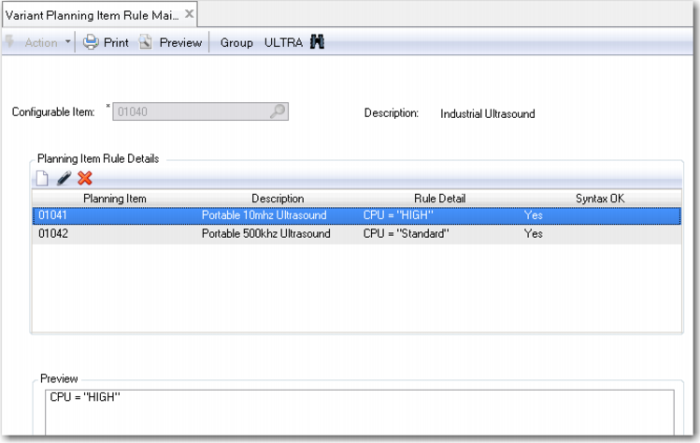
The recommended approach is to create a planning item (an item with Pur/Mfg set to F) that represents a configurable item. This planning item would have the forecast for the associated configurable item. For example, 01040 is a configurable item and 01040-P is the associated planning item. Variant Planning Item Rule Maintenance is used to link a configurable item to a planning item.
For the system to consume forecast of a planning item, variant items must be components of the planning item’s product structure. When a new variant item is created using the Configuration Questionnaire, the system adds the variant item to the product structure of the associated planning item.
A variant item is added to the planning bill as a component with the following values:
• Structure Type is P (planning)
• Forecast Percent is zero to prevent MRP from generating planned orders for the components of the variant item from the forecast of the planning item.
• Quantity Per is 1
Because Structure Type is P, the system consumes the forecast of the planning item with the variant item order quantity on the sales order line when the sales order line is confirmed.
The planning bill can also contain components from the generic product structure of the configurable item. Set up these components with Structure Type O (option). Then set Forecast Percent to the required value.
Exercise 44: Forecasting a Configurable Item
Use Item Master Maintenance (1.4.1) to create the item as follows:
Item Number | UM | Description 1 | Description 2 | Pur/Mfg |
01040-P | EA | Industrial Ultrasound | Planning Item | F |
Run Forecast Maintenance (22.1) in the Manufacturing module and enter a forecast for item 01040-P. Create this forecast in the default site of item 01040-P. Forecast a quantity of 100 a week for this week and the next 3 weeks.
Now use Variant Planning Item Rule Maintenance to link the configurable item 01040 to its associated planning item. Leave the selection rule blank.
Configurable Item | Planning Item |
01040 | 01040-P |
Run Sales Order Maintenance (7.1.1). Enter a new sales order for your selected customer. When you get to the sales order line, enter 01040 in the Item Number field. The Questionnaire automatically starts. Select New Configuration, complete the questionnaire, and create a variant item. Order a quantity of 5 and complete the sales order line. Ensure that Consume Forecast is selected on the sales order line.
Run Forecast Maintenance (22.3). Verify that the system has consumed the forecast of 01040-P by the quantity ordered on the sales order line.
Run Product Structure Inquiry (13.6) in the Manufacturing module and view the product structure of planning item 01040-P.
Deleting and Archiving Configurations
Each time you complete the questions in the questionnaire and click OK, QAD Configurator generates a new configuration in the database, containing all the answers to the questions for the configurable item. The configuration is created even if no variant is generated. As a consequence, the configuration table in the QAD Configurator database can grow rapidly
You can use Configuration Delete/Archive to archive one or more configurations to a file for later use, or permanently delete configurations from the set of configurations available in QAD Configurator.
This function lets you limit the set of available configurations in your QAD Configurator session by storing old configurations in a file or deleting them. If you create configurations regularly, the configuration table can grow rapidly. QAD Configurator cannot access the configurations in the file.
Warning If you do not enter any configuration IDs or variant numbers, QAD Configurator archives/deletes all the available configurations in the group.