QAD Enterprise Asset Management 2017.1
>
User Guide
>
Introduction
>
EAM Modules
EAM Modules
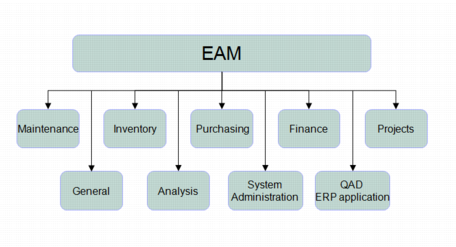
EAM groups related functionality into the following modules:
• Maintenance
• Inventory
• Purchasing
• Finance
• Project Accounting
• General
• Analysis
• System Administration
EAM Modules
Maintenance
Use Maintenance to drive work order functionality for maintenance and repair operations (MRO):
• Equipment
• PM/PdM
• Work Orders
• Service Requests
• Labor History
• Codes
• Documents
Inventory
Use Inventory to manage parts (inventoried and non-inventoried) across single or multiple plants, analyzing usage and reserves, and improving cost effectiveness:
• Inventory
• Physical Inventory
• Stock Replenishment
• Stores Requisition Lists
• Stores Requisition Approval Groups
• Rebuild Locations
• UOM Conversion
• Codes
• Documents
Purchasing
Use Purchasing to manage indirect purchasing (stock, non-stock, services):
• Purchase Orders
• Requisitions
• Blanket Orders
• Quotes
• Routing Substitutions
• Vendors
• Standard Clauses
• Currency
• Exchange Rates
• Approval Groups
• Codes
• Documents
Finance
Use Finance to manage accounting, taxes, overhead, and any money-related aspects of EAM operations:
• Accounting
• Tax
• Overhead
• Groups
• Codes
• Capitalization History
• Intercompany Accounts
• Documents
Project Accounting
Use Project Accounting under Finance to plan, track, and control detailed project budgeting for:
• Capital Projects
• Expense Projects
• Customer-Funded Projects
• Engineer-to-Order (ETO) projects
Project Accounts make status information on the entire budget or each job/phase of the budget readily available and visible by job spending limit or budget level.
General
Use General to set up common system properties:
• Business Units
• Business Segments
• Domains
• Sites
• Codes
• Employees
• Groups
• Revisions
Analysis
Use Analysis to display key information in an easy-to-use graphic format:
• Equipment
• Finance
• Inventory
• Labor
• PM
• Project
• Purchasing
• Service Requests
• System Administration
• Work Orders
System Administration
Use System Administration to alter menus, user permissions, roles, and system-wide configurable features:
• Users
• Roles
• User/Roles
• System Control
• ERP Interface
• User-Defined Fields
• Job Control
• System Sequence
• Site Sequences
• Registry
• Report Setup
• Mandatory Fields
• Req Reroute/Notify Fields
• PO Reroute/Notify Fields
• Screen Editor
• Report Designer
• User-Defined Mail
• Product Line
• Equipment Mapping to ERP
• Production Line Mapping to ERP
• Progress Editor
• Custom Programs
EAM and QAD Automation Solutions