EAM Module Displays
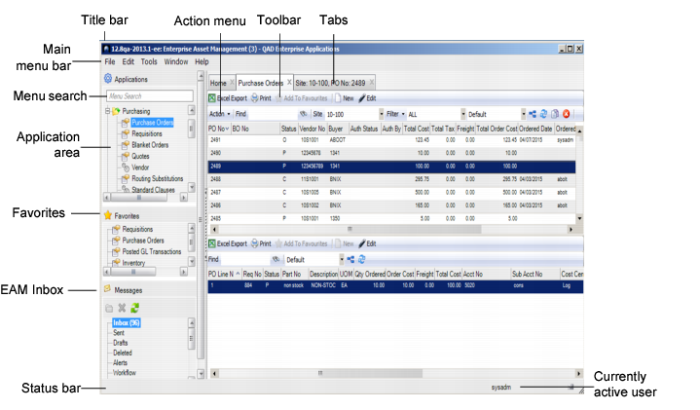
When not managed by process maps, EAM modules use standard display and navigation elements. Each display has a title bar, a vertical menu bar, a status bar, a menu, a toolbar, and an application area.
EAM UI Elements
Title Bar
The title bar displays the name of the database you are logged in to and “QAD Enterprise Applications.”
Example: Production: QAD Enterprise Applications.
Minimize, maximize, and exit buttons are standard controls for Windows. These tools enlarge, compress, or close the current window. Click exit to close the window and automatically log out of the session.
Note: To log out, you can also use File|Exit in the menu.
Main Menu Bar
The main menu bar is underneath the title bar near the upper left of the window. The menu display contains module-specific commands, so its appearance varies. Sometimes an option in the menu does the same thing as a button on the toolbar. For detailed information on the main menu bar, see the Introduction to QAD Enterprise Applications User Guide.
Application Area
The vertical menu contains all available EAM modules. Vertical menu items can include:
• Maintenance
• Inventory
• Purchasing
• Finance
• General
• Analysis
• System Administration
• Custom Menus