Filling Out an Employee Record
Enter the relevant information in the Personal, Codes, and User Defined tabs.
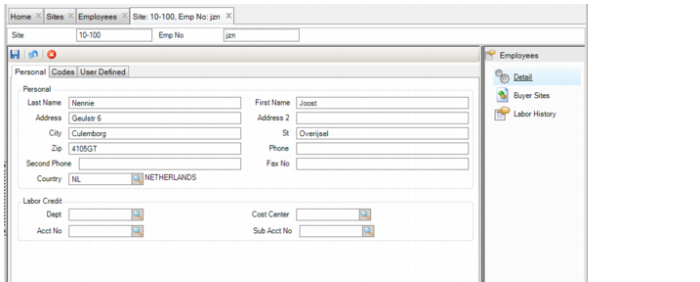
Employee: Personal Tab
Employee: Personal Tab
Personal
Last Name, First Name, Address, Address 2, City, St, Zip, Phone, Second Phone, Fax No, Country
In these fields, enter the employee name and contact information.
Labor Credit
Dept
When this employee posts labor to a work order, select the department to which the labor is credited. Department is not part of the GL accounting structure.
Cost Center, Acct No, Sub Acct No
In these fields, enter the labor credit accounting defaults. When this employee posts labor to a work order, these accounting defaults are used for the labor credit transaction.
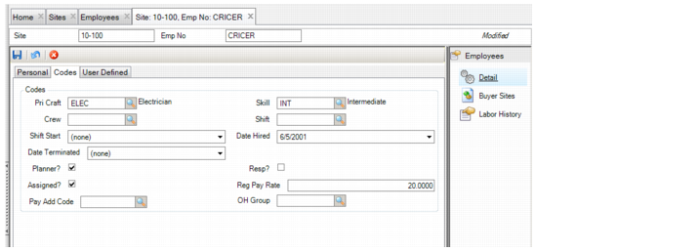
Employee: Codes Tab
The fields in the Codes tab determine which technicians should be scheduled for work orders.
Employee: Codes Tab
Codes
Primary Craft
Use the lookup to select the primary craft for the employee.
Skill
Use the lookup to select the employee’s skill level.
Crew
Use the lookup to select the crew for which the employee works.
Shift
Use the lookup to select which shift the employee works.
Shift Start
Select the date the employee’s shift started.
Date Hired
Select the employee’s hire date.
Date Terminated
Select the employee’s termination date.
Planner?
Select this check box if the employee is an inventory or equipment planner. When this option is selected, employee names or numbers are listed in the Planner lookup so that they can be selected as planners for a work order.
Responsible?
Select this check box if the employee is responsible for equipment. When this option is selected, employees’ names or numbers are listed in Resp lookup, where you can select an employee as the person responsible for a work order.
Assigned?
Select this check box if the employee can be assigned to a work order.
Reg Pay Rate
Enter the employee’s regular pay rate.
Pay Add Code
Use the lookup to select the pay add code for the employee.
OH Group
Use the lookup to select an OH group for this employee. When this option is selected, the OH rate is applied for the OH Group and is included in labor transactions for this employee.
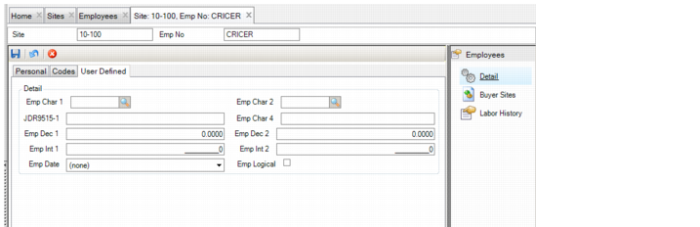
Employee: User Defined Tab
Employee: User Defined Tab
Detail
Emp Char 1-4
User-defined character fields, validated against tables that you add.
Emp Dec 1-2
User-defined decimal fields for employees.
Emp Int 1-2
User-defined integer fields for employees.
Emp Date
Enter a date type field here.
Emp Logical
User-defined check box.