Master Tool List
The master tool lists are used to build a standard list of tools for a preventive maintenance or repair work order. You can create multiple tool lists, group them by user-defined type fields, provide descriptions, and cross-reference other quality systems procedures. You can associate one master tool list with a number of PM templates or you can copy the list to corrective maintenance work orders.
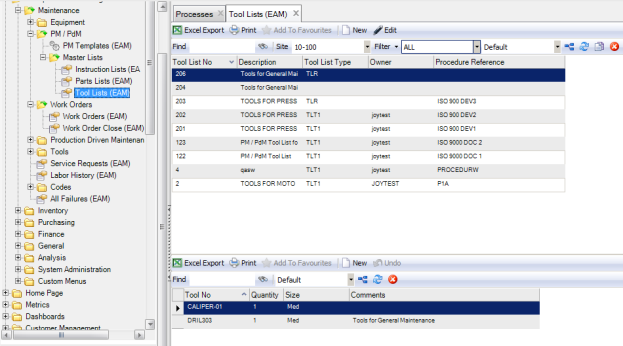
The Tool List browse is located in Maintenance|PM/PdM|Master Lists|Tool Lists.
Master Tool List
Creating a Tool List
Follow these steps to create a tool list:
1 Open the Tool List browse and click New in the upper browse.
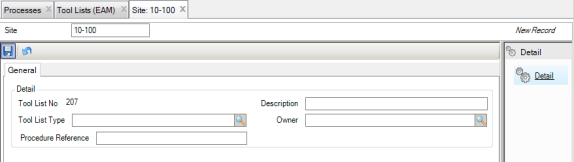
A blank tool list record opens. The system automatically assigns a tool list number, which you cannot modify.
2 Enter the necessary information in the General tab.
Tool List Header General Tab
Description
Enter the purpose of the master tool list.
Tool List Type
Select from a user-defined grouping for tool lists.
Owner
Select an owner from the lookup. This field limits record modification to the user or group specified here.
Procedure Reference
Enter a cross-reference to another application such as a quality system to identify this master tool list.
3 Once all the information has been entered, click Save.
Adding Tools to a Tool List
Follow these steps to add tools to a tool list:
1 Select the tool list and click New in the lower browse.
2 Enter the necessary information in the following fields:
Tool No
Use the lookup to select the tool to add to the list.
Note: The tool lookup is filtered to the specified source site.
Quantity
Enter the number of this tool required.
Size
Use the lookup to select the size of the required tool.
Comments
Enter optional comments about this line item.
3 Repeat these steps to add tools as necessary.