QAD Enterprise Asset Management 2017.1
>
User Guide
>
Finance
>
Overhead
Overhead
Overhead refers to a continuing cost of operating a business. Overhead usually groups expenses that are necessary to the continued functioning of the business, but that do not directly generate profits, such as accounting, advertising, depreciation, indirect labor, insurance, interest, legal fees, rent, repairs, supplies, taxes, telephone, travel, and utilities.
Overhead Rates
Set up overhead rates to associate with overhead groups. Overhead rates and groups add costs to a transaction to account for an organization’s overhead expenses.
Overhead Rates
Set up overhead rates to associate with overhead groups. Overhead rates and groups add costs to a transaction to account for an organization’s overhead expenses.
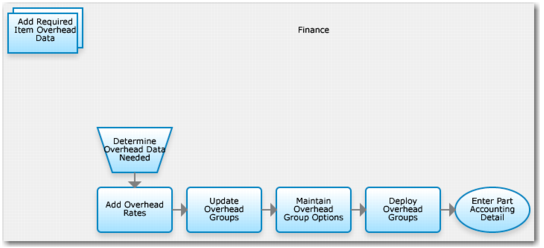
Add Overhead Rates Process Flow
1 Determine overhead rates data needed.
2 Add overhead rates.
3 Update overhead groups.
4 Maintain overhead group options.
5 Deploy overhead groups.
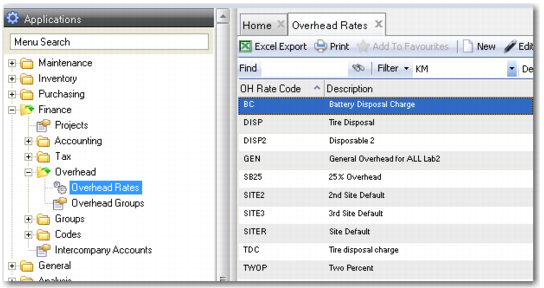
Overhead Rates Browse
Access this browse from Finance|Overhead|Overhead Rates. Use it to organize and display records, to access supporting functions, and to edit or create new records.
Overhead Rates Browse
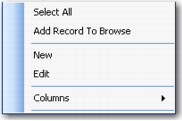
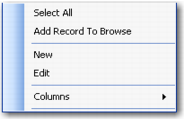
Overhead Rates Right-Click Menu
The right-click menu contains administrative functions and options from the Action menu.
Overhead Rates Right-Click Menu
New
Use New to open the overhead record detail to create a record.
Edit
Use Edit to open the overhead record detail to edit the selected record.
Columns
A list of columns available to the browse displays here. Select a column header to display it. Clear the column header to hide it.
Creating a New Overhead Rate
1 Click New.
2 Enter an overhead rate code and description.
Editing an Overhead Rates Record
1 Double-click a record from the browse or click Edit to open the overhead rates record detail.
2 Enter or edit an overhead rate description.
Overhead Groups
Use overhead groups to recover overhead expenses from operational cost centers and departments.
You can apply overhead groups (composed of overhead rates) to part issue and labor posting transactions. Overhead rates can be fixed monetary unit amounts or percentages of the total transaction cost. Build as many overhead rates and overhead groups as you need. You can set default overhead groups per site, part, and employee. You control whether users can modify overhead groups on transaction screens.
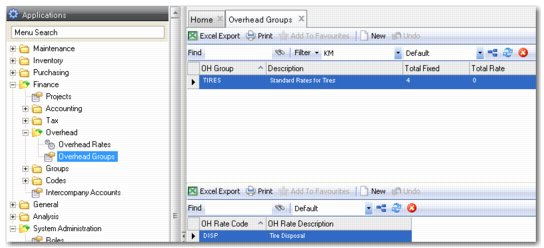
Overhead Groups Browse
Access this browse from Finance|Overhead|Overhead Groups. Use it to organize and display records, to access supporting functions, and to edit or create new records.
Overhead Groups Browse
Overhead Groups Right-Click Menu
The right-click menu contains administrative functions and options from the Action menu.
Overhead Groups Right-Click Menu
Creating a New Overhead Group
1 Click New in the upper browse.
2 Enter the overhead group name and a description.
3 Click New in the lower browse.
4 Select an overhead rate code from the lookup. Add as many overhead rates as required to build up the group’s fixed amount or total rate.
Editing an Overhead Group
1 Double-click a record from the upper browse.
2 Enter or edit the overhead group description.
3 Click New or Delete in the lower browse.
4 Add or subtract associated rates.