Finance
This section discusses the following Finance module topics:
Finance
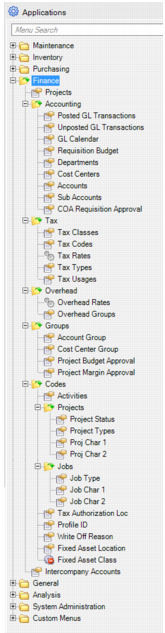
Use Finance to view, manage, and enter manual journal entry transactions, create and manage GL accounting calendars, access records for accounting periods that have been closed, and create and manage budgets. Finance includes:
• Accounting
• Tax
• Overhead
• Groups
• Codes
• Intercompany Accounts
Finance Menu
Setting Up Financial Data in EAM
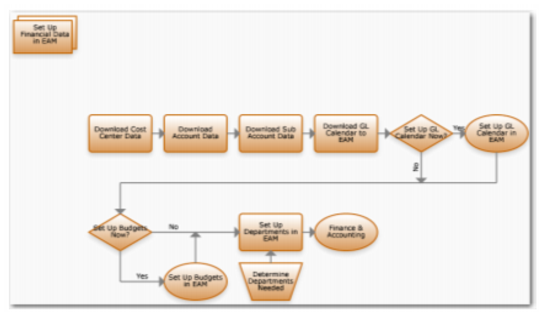
Set Up Financial Data Process Flow
1 Download cost center data from QAD ERP.
2 Download account data from QAD ERP.
3 Download sub-account data from QAD ERP.
4 Download GL calendar from QAD ERP to EAM.
5 Set up the GL calendar in the EAM application.
6 Download budget data from the EAM application.
7 Download budget data from QAD ERP.
8 Determine departments needed and set them up in EAM.
Setting Up the GL Calendar in EAM
Use this module to set up the GL accounting period calendar. Download the GL calendar from QAD ERP if one is there.
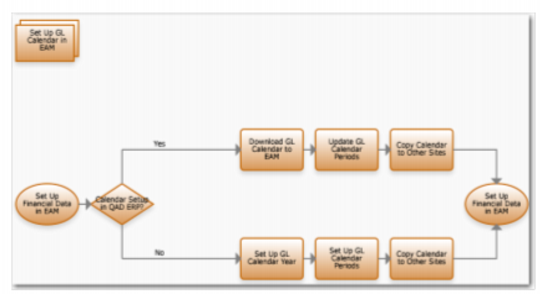
Set Up Accounting Calendar Process Flow
1 If the calendar in the QAD ERP application is already set up:
a Download the GL calendar year.
b Update the GL calendar period.
c Copy the calendar to other sites.
2 If QAD ERP does not offer a GL calendar:
a Set up the GL calendar year.
b Set up the GL calendar period.
c Copy the calendar to other sites.