QAD Enterprise Asset Management 2017.1
>
User Guide
>
Finance
>
Intercompany Accounts
Intercompany Accounts
Use intercompany accounts when GL transactions must go between sites (for example, inventory transfer between site A and site B), and you cannot use the default transfer cost center, account, and sub-account.
When a part relocates from one site to another, EAM credits the inventory from which it was removed, and debits the transit location. Use EAM System Administration|System Control Maintenance|System Site Maintenance|More Inv tabbed page to set up cost center, account number, and sub-account.
Define a unique default intercompany cost center, account, and sub-account to use when GL transactions go between the user’s primary site and other sites in EAM.
Intercompany Accounts
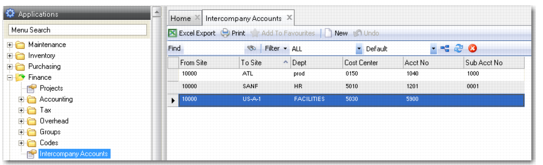
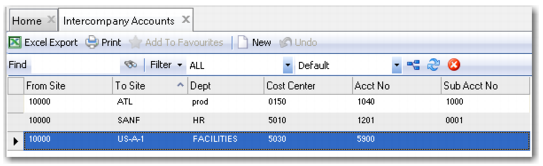
Access this browse from Finance|Intercompany Accounts. Organize and display records, access supporting functions, access existing or create new records, and export to Excel.
Intercompany Accounts Browse
Intercompany Accounts Right-Click Menu
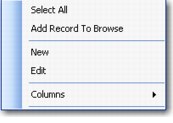
The right-click menu contains administrative functions and options from the Action menu.
Intercompany Accounts Right-Click Menu
New
Use New to open the intercompany accounts record detail to create a record.
Edit
Use Edit to open the intercompany accounts record detail to edit the selected record.
Columns
A list of columns available to the browse displays here. Select a column header to display it. Clear the column header to hide it.
Intercompany Accounts Record Detail
The record detail contains the information about this site’s Intercompany Accounts default cost center, account, and sub-account to be debited any time GL transactions go between this site and the highlighted other site.
Intercompany Accounts Record Detail
From Site
EAM enters the current user’s primary site. This value cannot be changed.
To Site
Select the site by using the lookup table available in the To Site field. Any other site that is involved in intercompany transactions and cannot use your site’s default transit accounting data should be set up here.
Dept.
The department to use in any intercompany transaction between the site listed in the To Site box and the From Site. Select the department through the Dept field’s lookup.
Cost Center
The cost center to use in any intercompany transaction between the site listed in the To Site box and the From Site. Select the cost center using the Cost Center field lookup.
Acct No
The account to use in any intercompany transaction between the site listed in the To Site box and the From Site. Select the account using the Acct No field lookup.
Sub Acct No
The sub-account to use in any intercompany transaction between the site listed in the To Site box and the From Site. Select the sub-account using the Sub Acct No field lookup.