QAD Enterprise Asset Management 2017.1
>
User Guide
>
Purchasing
>
Quotes
>
Awarding a Quote
Awarding a Quote
The Award action allows you to award bids to vendors that have a positive Award Qty entered on the lower browse. When the bids have been awarded, they can be turned into purchase orders.
Follow these steps to award bids to a vendor:
1 Open the quote line and select the Bids submenu.
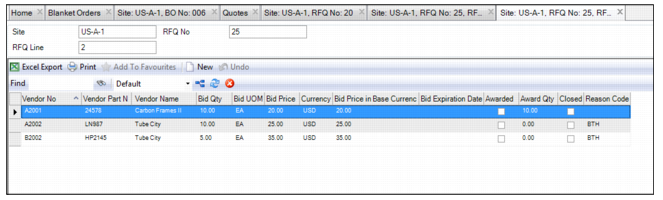
2 For the vendor that won the bid, enter the award quantity in the Award Qty field.
3 If there are vendors that did not win the bid, use the lookup in the Reason Code field and select the reason the vendors did not win the bid.
Awarding a Bid
4 For the remaining lines on the quote, enter the award quantities and the reason codes for the vendors that did not win the bid. Before you can award a quote, every line for each of the vendors must have the award quantity or reason code entered.
5 In the Quote browse, select Award from the Quote header Action menu. A message appears saying the quote has been awarded. EAM automatically closes the quote.