QAD Enterprise Asset Management 2017.1
>
User Guide
>
Purchasing
>
Quotes
Quotes
Overview
The Quote module, which is also referred to as Request for Quotation (RFQ), is used to allow the organization to request competitive bids on parts or services from various vendors. The Quote module contains a number of components:
• Quote Header. This component contains basic information about the quotation such as a general description, requester, assigned buyer, technical contacts, status, dates required, and response due dates by vendors. Requisitions can be turned into quotes or they can be added manually. See
Creating a Quote from a Requisition.
• Quote Line. This component is where a specific part or service is added. When quotes are created from requisitions, the quote lines are automatically created. Quote lines can also be created manually. See
Adding Lines to the Quote.
• Bids Sub Detail. This component is where vendors are added, and the buyer enters the vendor’s bid quantities, price, and valid dates to the quote line.
Quotes Process Flow
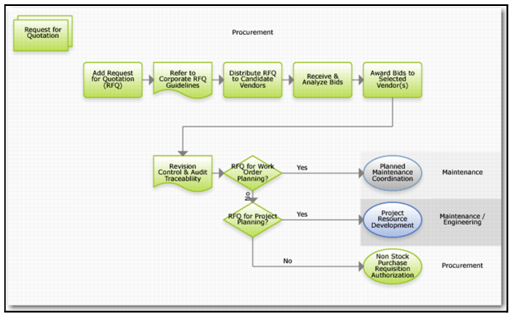
Creating a Request for Quotation Process Flow
To create a request for quotation:
1 Refer to corporate RFQ guidelines.
2 Distribute RFQ to candidate vendors.
3 Receive and analyze bids.
4 Award bids to selected vendor or vendors.
5 If the RFQ is needed for project or work order planning, direct it to that group for authorization.
6 If the RFQ is not needed for project or work order planning, direct it to the proper group for authorization.